
Conversion Tracking Complete Guide 2026: Accurate Measurement
Conversion Tracking Complete Guide 2026: Accurate Measurement
Accurate conversion tracking is essential for optimizing ad performance and proving ROI. This comprehensive guide covers everything you need to know about tracking conversions across Meta, Google, and analytics platforms in 2026.
Table of Contents
- The Conversion Tracking Landscape
- Meta Conversion Tracking
- Google Ads Conversion Tracking
- Google Analytics 4 Events
- Attribution Models
- Cross-Platform Tracking
- Offline Conversion Tracking
- Testing and Validation
The Conversion Tracking Landscape
The Privacy-First Era
2026 tracking challenges:
- iOS 14.5+ App Tracking Transparency
- Browser privacy features
- Third-party cookie deprecation
- Regulatory requirements (GDPR, CCPA)
Impact:
- 20-40% data loss on some platforms
- Delayed reporting
- Reduced attribution accuracy
- Need for server-side solutions
The Multi-Touch Reality
Customer journeys are complex:
Discovery → Consideration → Conversion → Retention
    ↓           ↓              ↓            ↓
  Social      Search         Website      Email
  Video       Display        Store        Support
  Display     Remarketing    Phone        Community
Average Touchpoints Before Conversion:
- B2C E-commerce: 3-5 touches
- B2B SaaS: 7-13 touches
- High-Value Products: 10+ touches
Tracking Architecture Overview
User Journey
├── Meta Pixel (Browser)
├── Meta CAPI (Server)
├── [Google Ads](https://support.google.com/adspolicy/answer/6008942) Tag (Browser)
├── Google Ads API (Server)
├── GA4 (Browser + Server)
└── CRM/Offline Data
    ↓
Attribution Models
└── Unified Reporting
Meta Conversion Tracking
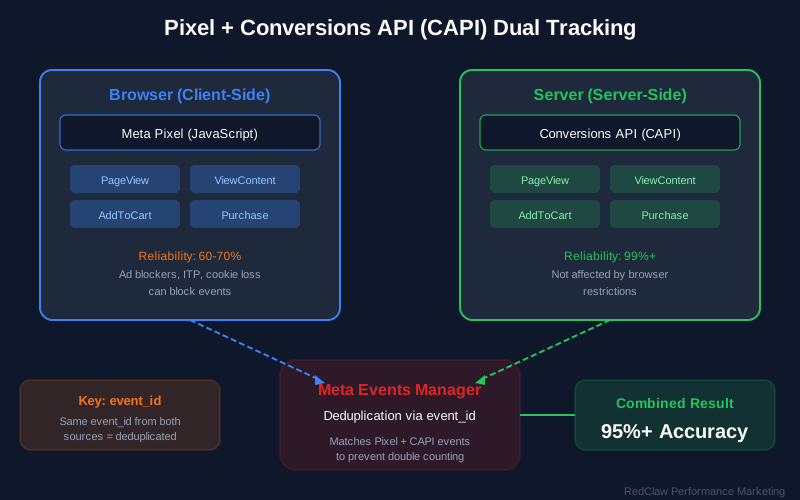
Pixel + CAPI Dual Setup
Why Both Matter:
| Method | Strengths | Weaknesses |
|---|---|---|
| Pixel | Real-time, rich data | Browser-dependent |
| CAPI | Server-side, resilient | Requires development |
| Combined | Maximum coverage | More complex setup |
Implementation Priority:
- Base Pixel (PageView)
- Standard Events (Purchase, Lead, etc.)
- CAPI Integration
- Event Deduplication
- Parameter Optimization
Essential Meta Events
E-commerce Funnel:
| Event | Trigger | Priority |
|---|---|---|
| PageView | All pages | Required |
| ViewContent | Product pages | High |
| Search | Search results | Medium |
| AddToCart | Cart addition | High |
| AddToWishlist | Wishlist addition | Low |
| InitiateCheckout | Checkout start | High |
| AddPaymentInfo | Payment entry | Medium |
| Purchase | Order complete | Critical |
Lead Generation Funnel:
| Event | Trigger | Priority |
|---|---|---|
| PageView | Landing page | Required |
| ViewContent | Content view | Medium |
| Lead | Form submission | Critical |
| SubmitApplication | Application sent | High |
| Schedule | Meeting booked | High |
| Contact | Contact initiated | Medium |
Event Parameters
Purchase Event Example:
fbq('track', 'Purchase', {
    // Required
    value: 149.99,
    currency: 'USD',

    // Recommended
    content_ids: ['SKU123', 'SKU456'],
    content_type: 'product',
    content_name: 'Product Bundle',
    content_category: 'Electronics',
    num_items: 2,
    order_id: 'ORD-2026-12345',

    // Advanced
    predicted_ltv: 299.99,
    status: 'completed'
});
Lead Event Example:
fbq('track', 'Lead', {
    value: 50.00,
    currency: 'USD',
    content_name: 'Ebook Download',
    content_category: 'Marketing Resources',
    status: 'submitted'
});
Conversion API Setup
Server-Side Event Structure:
{
    "event_name": "Purchase",
    "event_time": 1709251200,
    "event_id": "purchase_12345_1709251200",
    "event_source_url": "https://example.com/checkout/success",
    "action_source": "website",
    "user_data": {
        "em": "hashed_email@example.com",
        "ph": "hashed_phone",
        "client_ip_address": "192.168.1.1",
        "client_user_agent": "Mozilla/5.0...",
        "fbc": "fb.1.1709251200.abc123",
        "fbp": "fb.1.1709251199.def456"
    },
    "custom_data": {
        "value": 149.99,
        "currency": "USD",
        "content_ids": ["SKU123", "SKU456"],
        "content_type": "product",
        "order_id": "ORD-2026-12345"
    }
}
Event Match Quality
Factors Affecting Match Quality:
| Factor | Impact | Implementation |
|---|---|---|
| Email Hash | High | Send hashed email |
| Phone Hash | High | Send hashed phone |
| fbp Cookie | Medium | Capture from browser |
| fbc Parameter | Medium | Extract from URL |
| External ID | Medium | Your user ID |
Target Scores:
- 9-10: Excellent (optimal optimization)
- 7-8.9: Good (strong performance)
- 5-6.9: Fair (room for improvement)
- Below 5: Poor (significant impact)
Google Ads Conversion Tracking
Google Tag Setup
Implementation Options:
- Google Tag (gtag.js)
<!-- Google tag (gtag.js) -->
- Create Conversion Tracking tag
- Set trigger for conversion event
- Publish container
- Google Ads API
- Server-side conversion upload
- Enhanced conversions
- Offline conversion import
Conversion Actions
Primary vs. Secondary:
| Type | Use Case | Bidding Impact |
|---|---|---|
| Primary | Main business goals | Used for optimization |
| Secondary | Supporting metrics | Tracked but not optimized |
Conversion Categories:
| Category | Examples |
|---|---|
| Purchase | Sale, Subscription |
| Add to cart | Cart addition |
| Begin checkout | Checkout initiation |
| Submit lead form | Form completion |
| Sign-up | Registration |
| Phone call lead | Call from ads |
| Download | App, Document |
Enhanced Conversions
What It Does:
- Improves measurement accuracy
- Uses hashed first-party data
- Better attribution
- Privacy-safe
Setup Process:
- Enable in Google Ads
- Implement on website
- Hash user data
- Send with conversion
Code Example:
gtag('event', 'conversion', {
    'send_to': 'AW-XXXXXXXXX/CONVERSION_LABEL',
    'value': 50.0,
    'currency': 'USD',
    'transaction_id': 'ORDER_12345',
    'user_data': {
        'email': 'hashed_email@example.com',
        'phone_number': 'hashed_phone',
        'address': {
            'sha256_first_name': 'hashed_first',
            'sha256_last_name': 'hashed_last',
            'country': 'US',
            'postal_code': '12345'
        }
    }
});
Conversion Values and Currency
Dynamic Value Tracking:
// E-commerce transaction
gtag('event', 'conversion', {
    'send_to': 'AW-XXXXXXXXX/CONVERSION_LABEL',
    'value': transaction_value,
    'currency': 'USD',
    'transaction_id': order_id
});
Value Rules:
- Use actual transaction values
- Include tax and shipping consistently
- Match currency to account settings
- Use unique transaction IDs
Google Analytics↗ 4 Events
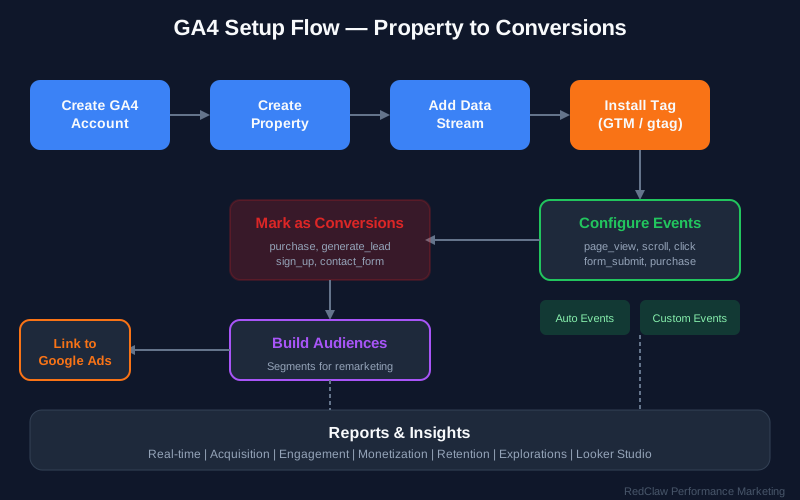
GA4 Event Structure
Automatically Collected:
- page_view
- scroll
- click
- view_search_results
- video_start, video_complete
- file_download
- form_start, form_submit
Enhanced Measurement: Enable in GA4 settings:
- Page views
- Scrolls (90%)
- Outbound clicks
- Site search
- Video engagement
- File downloads
- Form interactions
Recommended Events
E-commerce:
gtag('event', 'purchase', {
    transaction_id: 'T_12345',
    value: 259.99,
    tax: 20.00,
    shipping: 15.00,
    currency: 'USD',
    items: [{
        item_id: 'SKU_12345',
        item_name: 'Product Name',
        item_category: 'Category',
        price: 129.99,
        quantity: 2
    }]
});
Lead Generation:
gtag('event', 'generate_lead', {
    currency: 'USD',
    value: 50.00
});
Custom Events:
gtag('event', 'trial_started', {
    plan_type: 'premium',
    trial_length: '14_days',
    source: 'pricing_page'
});
GA4 + Google Ads Integration
Linking Process:
- Google Ads → Tools → Linked Accounts
- Select GA4 property
- Enable auto-tagging
- Import conversions from GA4
Benefits:
- Unified reporting
- GA4 audiences in Google Ads
- Cross-platform insights
- Enhanced attribution
Attribution Models
Understanding Attribution
Attribution determines how credit for conversions is distributed across touchpoints.
Common Models:
| Model | Description | Best For |
|---|---|---|
| Last Click | 100% to final touch | Simple funnels |
| First Click | 100% to initial touch | Awareness focus |
| Linear | Equal credit to all | Long sales cycles |
| Time Decay | More credit to recent | Short cycles |
| Position-Based | 40/20/40 first/middle/last | Balanced approach |
| Data-Driven | Algorithmic distribution | Sufficient data |
Platform-Specific Attribution
- Default: 7-day click, 1-day view
- Options: 1-day, 7-day, 28-day click
- View-through conversions included
Google Ads:
- Default: Last Google Ads click
- Options: First click, Linear, Time decay, Position-based, Data-driven
- Cross-account attribution available
Google Analytics 4:
- Default: Data-driven
- Options: All standard models
- Cross-channel view
Choosing the Right Model
Considerations:
| Factor | Recommendation |
|---|---|
| Sales Cycle Length | Longer = more touchpoints |
| Customer Journey Complexity | Complex = data-driven |
| Data Volume | Sufficient for data-driven (300+ conversions) |
| Channel Mix | Multi-channel = position-based or data-driven |
| Business Model | B2B = longer attribution windows |
Cross-Platform Tracking
Unified Tracking Strategy
Goal: Understand the complete customer journey across platforms.
Implementation:
User Journey
├── Meta (Discovery)
│   ├── Pixel tracks engagement
│   └── CAPI sends conversion
├── Google Ads (Search)
│   ├── Tag tracks click
│   └── Conversion action fires
├── GA4 (Analytics)
│   ├── Events track behavior
│   └── Attribution model applies
└── CRM (Offline)
    ├── Lead status updates
    └── Revenue attribution
UTM Parameters
Consistent UTM Strategy:
| Parameter | Purpose | Example |
|---|---|---|
| utm_source | Platform | facebook, google, linkedin |
| utm_medium | Channel | cpc, social, email |
| utm_campaign | Campaign name | spring_sale_2026 |
| utm_content | Creative variant | video_v1, carousel_v2 |
| utm_term | Keyword (search) | project_management_software |
URL Builder Output:
https://example.com/?utm_source=facebook
&utm_medium=social
&utm_campaign=spring_sale_2026
&utm_content=video_testimonial
Cross-Domain Tracking
When Needed:
- Multiple websites
- Subdomain tracking
- Third-party checkout
- Separate landing pages
GA4 Implementation:
gtag('config', 'GA_MEASUREMENT_ID', {
    'linker': {
        'domains': ['example.com', 'checkout.example.com', 'shop.example.com']
    }
});
Offline Conversion Tracking
Why Offline Tracking Matters
Offline Touchpoints:
- Phone calls
- In-store purchases
- Sales meetings
- CRM conversions
- Subscription renewals
Benefits:
- Complete attribution picture
- Improved optimization
- Better audience targeting
- Accurate ROI measurement
Meta Offline Conversions
Upload Methods:
- Manual Upload: CSV in Events Manager
- API Integration: Automated server-to-server
- Partner Integration: CRM connectors
Required Data:
email,phone,event,event_time,value,currency
user@example.com,1234567890,purchase,2026-03-01T12:00:00,100.00,USD
Matching Process:
- Hash PII before upload
- Match to ad exposure
- Attribute to campaigns
- Update reporting
Google Ads Offline Conversions
Enhanced Conversions for Leads:
- Upload conversion data
- Match to ad clicks
- Improve attribution
- Optimize bidding
Google Ads API Upload:
from google.ads.googleads.client import GoogleAdsClient

conversion_action = client.get_service("GoogleAdsService").upload_click_conversions(
    customer_id=customer_id,
    conversions=[{
        "conversion_action": conversion_action_resource,
        "gclid": "DCLID_FROM_CRM",
        "conversion_date_time": "2026-03-01 12:00:00+08:00",
        "conversion_value": 100.00,
        "currency_code": "USD"
    }]
)
Testing and Validation
Testing Tools
Meta:
- Meta Pixel Helper (Chrome extension)
- Events Manager Test Events
- Conversions API Testing
Google Ads:
- Tag Assistant
- Conversion Action Test
- Website Call Conversion Test
GA4:
- DebugView
- Real-time reports
- Tag Assistant
Validation Checklist
Pixel/Tag Installation:
- Base code on all pages
- No JavaScript errors
- Fires on page load
- Parameters populate correctly
Event Tracking:
- All standard events configured
- Custom events firing
- Values accurate
- Currency correct
Attribution:
- Conversions attributed correctly
- Attribution window appropriate
- Cross-device tracking working
- Offline conversions uploading
Data Quality:
- Match quality scores high
- No duplicate events
- Transaction IDs unique
- Values match backend
Common Issues and Solutions
Missing Conversions:
- Check pixel firing
- Verify event parameters
- Review attribution window
- Check for ad blockers
Duplicate Conversions:
- Implement deduplication
- Use unique transaction IDs
- Check CAPI + Pixel overlap
- Review event timing
Incorrect Values:
- Verify value calculation
- Check currency settings
- Review tax/shipping inclusion
- Match to backend data
Conclusion
Accurate conversion tracking requires a comprehensive, multi-platform approach:
- Dual Tracking: Browser + server-side for maximum coverage
- Complete Events: Track the full funnel, not just purchases
- Quality Data: Focus on match quality and parameter accuracy
- Proper Attribution: Choose models that reflect your customer journey
- Continuous Testing: Regular validation and optimization
The investment in proper tracking infrastructure pays dividends through better optimization, accurate reporting, and improved ROI.
Need help with conversion tracking setup? RedClaw Performance provides comprehensive tracking implementation and optimization services.
Related Posts
iGaming Player Psychology: The Science Behind Why Players Click, Engage, and Convert
Discover the psychological triggers driving iGaming player behavior. Learn how dopamine loops, cognitive biases, and player archetypes influence conversion rates. Data-driven insights for 2026.
Ad Data Analysis for Beginners 2026 | Essential Guide to Data Interpretation
Learn ad data analysis from scratch. Master core metrics like CTR, CPC, ROAS, and conversion tracking. Understand what the data means and make smarter advertising decisions with our comprehensive beginner's guide.
UTM Parameters Guide 2026: Track Every Campaign Click
Master UTM parameters for accurate campaign tracking. Naming conventions, GA4 attribution, URL builder tips, and common mistakes to avoid.