
UTM Parameters Guide 2026: Track Every Campaign Click
UTM Parameters Usage Guide 2026: Complete Campaign Tracking Tutorial
UTM parameters are the foundation of accurate campaign tracking and marketing attribution. This comprehensive guide covers everything you need to know about using UTM parameters effectively in 2026, from basic implementation to advanced tracking strategies that will transform your marketing analytics.
📊 Ready to improve your marketing attribution? Contact RedClaw Performance for professional UTM implementation and tracking setup services.
Table of Contents
- Understanding UTM Parameters
- UTM Parameter Definitions
- UTM Naming Conventions
- Platform-Specific Strategies
- UTM Builder Tools
- Advanced UTM Strategies
- Common Mistakes to Avoid
- UTM Governance and Maintenance
- UTM Parameters FAQ
Understanding UTM Parameters
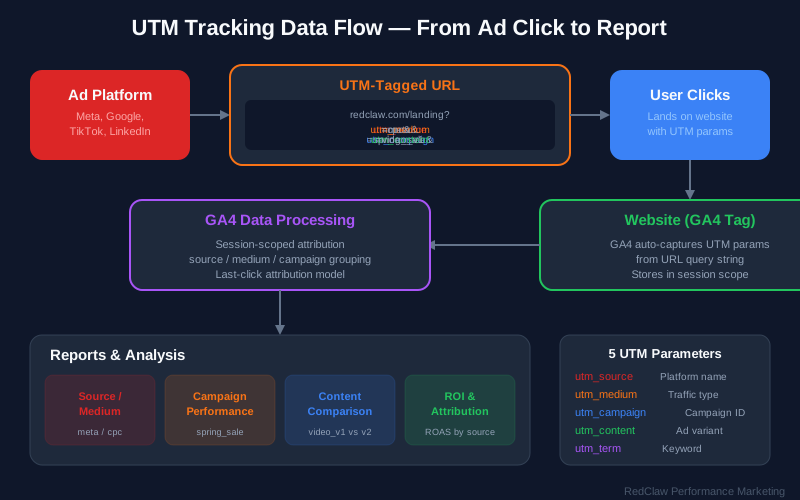
What Are UTM Parameters?
UTM (Urchin Tracking Module) parameters are text tags added to the end of URLs to track the effectiveness of marketing campaigns across different traffic sources and publishing media. Originally developed by Urchin Software Corporation (acquired by Google in 2005), these parameters have become the industry standard for campaign tracking across all major analytics platforms.
How UTM Parameters Work:
https://example.com/?utm_source=facebook
                           ↓
                    Identifies platform (Facebook)

https://example.com/?utm_medium=social
                           ↓
                    Identifies channel type (Social Media)

https://example.com/?utm_campaign=spring_sale_2026
                           ↓
                    Identifies specific campaign (Spring Sale)
When a user clicks a link with UTM parameters, those tags are sent to your analytics platform (like Google Analytics↗), allowing you to identify exactly which marketing effort brought that visitor to your site.
Why UTM Parameters Matter for Marketing Tracking
Benefits of Proper UTM Implementation:
- Accurate attribution - Know exactly which campaigns drive conversions
- Campaign performance comparison - Compare ROI across different initiatives
- Channel effectiveness analysis - Identify your highest-performing marketing channels
- ROI calculation - Calculate return on investment for each campaign
- Data-driven optimization - Make informed decisions based on actual performance data
The Cost of Not Using UTM Parameters:
| Without UTMs | Impact |
|---|---|
| Traffic lumped into "Direct" | 40-60% of traffic misattributed |
| No campaign-level insights | Cannot compare campaign performance |
| Difficult to compare channels | No apples-to-apples comparison possible |
| Incomplete attribution picture | Missed optimization opportunities |
| Wasted ad spend | Budget allocated to underperforming channels |
Internal Link Suggestion: Learn more about marketing attribution models and how UTM parameters feed into multi-touch attribution analysis.
UTM-Enabled Analytics Platforms
Primary Analytics Platforms Supporting UTM Tracking:
| Platform | UTM Support | Best For |
|---|---|---|
| Google Analytics 4 | Full native support | Most websites and apps |
| Adobe Analytics | Full native support | Enterprise organizations |
| Mixpanel | Full native support | Product analytics |
| Amplitude | Full native support | Growth analytics |
| Heap | Full native support | Behavioral analytics |
| Matomo | Full native support | Privacy-focused tracking |
Marketing Platforms with UTM Integration:
- Google Ads↗ (auto-tagging + manual UTMs)
- Meta Ads↗ (Facebook & Instagram)
- LinkedIn Ads
- Twitter/X Ads
- TikTok Ads↗
- Pinterest Ads
- Email marketing platforms (Mailchimp, HubSpot, Klaviyo)
- CRM systems (Salesforce, HubSpot)
UTM Parameter Definitions
The Five Standard UTM Parameters Explained
Understanding each UTM parameter is crucial for accurate campaign tracking. Here's a comprehensive breakdown:
| Parameter | Required | Purpose | Example Values |
|---|---|---|---|
utm_source | ✅ Yes | Identifies where traffic originates | facebook, google, newsletter, linkedin |
utm_medium | ✅ Yes | Identifies the marketing medium/channel | cpc, email, social, banner, organic |
utm_campaign | ✅ Yes | Identifies the specific campaign name | spring_sale_2026, product_launch |
utm_term | ❌ No | Tracks keywords (primarily for paid search) | project_management_software |
utm_content | ❌ No | Differentiates similar content/creative | video_ad, sidebar_banner, variant_a |
Detailed UTM Parameter Guide
utm_source - The Origin Identifier
The utm_source parameter identifies the referring source or platform that sent the traffic. This is typically the website, platform, or publication where your link appeared.
Common utm_source Values:
| Source Type | Examples | Use Case |
|---|---|---|
| Social Platforms | facebook, instagram, linkedin, twitter, tiktok | Social media marketing |
| Search Engines | google, bing, duckduckgo | Organic and paid search |
| newsletter, promo_email, transactional | Email marketing campaigns | |
| Websites | nytimes, techcrunch, partner_site | Referral traffic |
| Offline | qr_code, print_ad, billboard, tv | Offline-to-online tracking |
Best Practices for utm_source:
- Use platform names consistently across all campaigns
- Always use lowercase letters only
- Never use spaces (replace with underscores)
- Be specific but concise (use "facebook" not "fb" or "FB")
- Document your approved source values in a shared guide
utm_medium - The Channel Identifier
The utm_medium parameter identifies the marketing medium or channel type. This helps you understand which types of marketing activities are performing best.
Standard utm_medium Values:
| Medium | Definition | Use Case |
|---|---|---|
cpc | Cost Per Click | Paid search, paid social ads |
organic | Unpaid/Natural | Organic search, organic social |
email | Email marketing | Newsletters, promotional emails |
social | Organic social | Unpaid social media posts |
display | Display advertising | Banner ads, programmatic |
video | Video advertising | YouTube ads, video campaigns |
affiliate | Affiliate marketing | Partner/affiliate referrals |
referral | Referral traffic | Partner links, guest posts |
sms | Text messaging | SMS marketing campaigns |
push | Push notifications | Mobile/web push messages |
utm_campaign - The Campaign Identifier
The utm_campaign parameter names your specific marketing initiative. This is where you identify what promotion, product launch, or seasonal campaign the link belongs to.
Effective Campaign Naming Examples:
- Product launches:
launch_crm_pro_march_2026 - Seasonal promotions:
spring_sale_2026,black_friday_2026 - Content campaigns:
content_ai_guide_march_2026 - Webinars and events:
webinar_ga4_setup_march_2026 - Evergreen campaigns:
brand_awareness_q1_2026,prospecting_always_on
Campaign Naming Best Practices:
- Always include date or quarter for time-bound campaigns
- Use descriptive names that anyone can understand
- Maintain a consistent format across all campaigns
- Avoid special characters that might break URLs
- Keep campaign names under 50 characters when possible
utm_term - The Keyword Tracker
The utm_term parameter is primarily used for tracking keywords in paid search campaigns. While Google Ads auto-tagging handles this automatically for Google campaigns, utm_term is useful for:
- Bing Ads campaigns
- Manual keyword tracking
- A/B testing different keyword variations
Examples:
project_management_softwarecrm_for_small_businessbest_email_marketing_toolfree_trial_offer
utm_content - The Creative Differentiator
The utm_content parameter helps you differentiate between similar content, creative variations, or link placements within the same campaign.
Common utm_content Use Cases:
| Use Case | Example Values |
|---|---|
| A/B testing | variant_a, variant_b, control |
| Creative types | video, carousel, static_image, story |
| Ad placement | header, sidebar, footer, popup |
| Button text | get_started, learn_more, buy_now |
| Audience segments | lookalike_1, retargeting, prospecting |
| Device targeting | mobile, desktop, tablet |
🚀 Want to implement advanced UTM tracking? Schedule a free consultation with our analytics experts to set up custom UTM taxonomy for your organization.
UTM Naming Conventions
Standardized UTM Naming Framework
Creating a standardized naming framework ensures consistency across your entire marketing organization. Here's a proven structure:
Recommended Format:
utm_source: [platform_name]
utm_medium: [channel_type]
utm_campaign: [campaign_descriptor]_[date_or_quarter]
utm_content: [creative_type]_[variant_or_placement]
Complete URL Example:
https://example.com/?utm_source=facebook
&utm_medium=cpc
&utm_campaign=spring_sale_march_2026
&utm_content=video_testimonial_v1
UTM Examples by Marketing Channel
Paid Social Media Campaigns:
https://example.com/?utm_source=facebook
&utm_medium=cpc
&utm_campaign=spring_sale_march_2026
&utm_content=video_testimonial_v1
Email Marketing Campaigns:
https://example.com/?utm_source=newsletter
&utm_medium=email
&utm_campaign=weekly_digest_march_2026
&utm_content=hero_cta
Organic Social Media:
https://example.com/?utm_source=linkedin
&utm_medium=social
&utm_campaign=thought_leadership_q1_2026
&utm_content=carousel_tips
Paid Search Campaigns:
https://example.com/?utm_source=google
&utm_medium=cpc
&utm_campaign=brand_search_q1_2026
&utm_term=acme_crm
Affiliate Marketing:
https://example.com/?utm_source=partner_site
&utm_medium=affiliate
&utm_campaign=affiliate_promo_march_2026
&utm_content=sidebar_banner
UTM Naming Best Practices
Critical Consistency Rules:
- Always use lowercase - Analytics platforms are case-sensitive
- Use underscores for spaces - Never use actual spaces or hyphens inconsistently
- No special characters - Avoid !@#$%^&*() in parameter values
- Keep under 100 characters - Longer URLs may get truncated
- Document your conventions - Create a shared team guide
Source Naming Standards:
| Platform | ✅ Correct | ❌ Incorrect |
|---|---|---|
facebook | Facebook, fb, FB | |
instagram | IG, insta, Insta | |
| Google Ads | google | Google, adwords, gads |
linkedin | LinkedIn, li, LI | |
| Twitter/X | twitter | x, X, Twitter |
| YouTube | youtube | YouTube, yt |
newsletter | Email, e-mail, mail | |
| Bing | bing | Bing, microsoft |
Campaign Naming Conventions by Type:
| Campaign Type | Format Pattern | Example |
|---|---|---|
| Product Launch | launch_[product]_[date] | launch_crm_pro_march_2026 |
| Seasonal Sale | [season]_sale_[year] | spring_sale_2026 |
| Content Promotion | content_[topic]_[date] | content_ai_guide_march_2026 |
| Webinar/Event | webinar_[topic]_[date] | webinar_ga4_setup_march_2026 |
| Evergreen/Always-On | [type]_always_on_[quarter] | prospecting_always_on_q1 |
| Retargeting | retargeting_[audience]_[date] | retargeting_cart_abandoners_march |
| Brand Campaign | brand_[objective]_[quarter] | brand_awareness_q1_2026 |
Internal Link Suggestion: Check out our complete marketing analytics setup guide to learn how UTM parameters integrate with your overall tracking infrastructure.
Platform-Specific Strategies
Meta Ads (Facebook & Instagram) UTM Implementation
Understanding Meta's Auto-Tagging Limitations:
Unlike Google Ads, Meta (Facebook and Instagram) does not automatically add UTM parameters to your links. You must manually add UTMs or use URL parameters at the account level.
Setup Method 1: Ad Level (Manual Entry)
Add UTM parameters directly to each ad's website URL:
Website URL: https://example.com/?utm_source=facebook
&utm_medium=cpc
&utm_campaign=spring_sale_march_2026
&utm_content=video_v1
Setup Method 2: Tracking Template (Account Level)
Configure a tracking template in your Meta Ads account settings:
{lpurl}?utm_source=facebook
&utm_medium=cpc
&utm_campaign={campaign.name}
&utm_content={ad.name}
Available Meta Dynamic Parameters:
| Parameter | Description | Example Output |
|---|---|---|
{campaign.name} | Inserts campaign name | Spring Sale March 2026 |
{adset.name} | Inserts ad set name | Lookalike 1% |
{ad.name} | Inserts ad name | Video Testimonial V1 |
{placement} | Inserts placement | facebook, instagram, messenger |
Google Ads UTM Best Practices
Auto-Tagging with GCLID:
Google Ads automatically appends a gclid parameter when auto-tagging is enabled. This is essential for Google Ads conversion tracking but doesn't provide the cross-platform consistency that UTMs offer.
Using Both UTM and Auto-Tagging:
For maximum tracking capability, use both UTM parameters and auto-tagging together:
https://example.com/?utm_source=google
&utm_medium=cpc
&utm_campaign=search_brand_q1
&gclid=ABC123...
Google Ads Tracking Template:
Set up at the account level:
{lpurl}?utm_source=google
&utm_medium=cpc
&utm_campaign={campaignid}
&utm_content={adgroupid}
&utm_term={keyword}
Google Ads ValueTrack Parameters:
| Parameter | Description | Use Case |
|---|---|---|
{campaignid} | Campaign ID | Internal tracking |
{adgroupid} | Ad group ID | Granular analysis |
{creative} | Ad ID | Creative performance |
{keyword} | Matched keyword | Keyword analysis |
{matchtype} | Match type | Match type performance |
{device} | Device type | Device comparison |
{placement} | Placement (Display) | Placement analysis |
LinkedIn Ads UTM Strategy
Campaign Manager Setup:
Add UTM parameters to your landing page URLs in LinkedIn Campaign Manager:
Landing Page URL: https://example.com/?utm_source=linkedin
&utm_medium=cpc
&utm_campaign=b2b_lead_gen_q1
&utm_content=sponsored_content_v1
LinkedIn-Specific Best Practices:
- Always use
linkedinas the source (not "LinkedIn" or "li") - Segment campaigns by objective (awareness, consideration, conversion)
- Test organic vs. paid attribution by using different campaign names
- Use utm_content to differentiate between sponsored content, message ads, and dynamic ads
Email Marketing UTM Implementation
Major Email Platform Integrations:
Mailchimp:
- Navigate to Campaign Settings
- Enable "Google Analytics link tracking"
- Customize UTM parameters:
- utm_source: mailchimp
- utm_medium: email
- utm_campaign: [auto-populated from campaign name]
HubSpot:
- Go to Marketing > Email
- Enable UTM tracking in email settings
- Customize parameters per campaign
- HubSpot automatically appends UTMs to all links
Klaviyo:
- Settings > Google Analytics
- Enable UTM tracking
- Configure default parameters
- Override per campaign as needed
Manual Email UTM Structure:
For email platforms without auto-UTM features:
https://example.com/?utm_source=newsletter
&utm_medium=email
&utm_campaign=march_2026_newsletter
&utm_content=hero_button
Email-Specific utm_content Values:
| Email Element | utm_content Value |
|---|---|
| Main call-to-action | hero_cta |
| Secondary button | secondary_cta |
| Sidebar promotion | sidebar_banner |
| Footer navigation | footer_link |
| In-content text link | text_link |
| Header logo | header_logo |
| Social media icons | social_icons |
| Unsubscribe link | unsubscribe |
Organic Social Media UTM Tracking
Profile and Bio Links:
Track traffic from your social media profiles:
Bio/Profile URL:
https://example.com/?utm_source=instagram
&utm_medium=social
&utm_campaign=profile_bio
&utm_content=link_in_bio
Individual Post Tracking:
Track specific posts for performance analysis:
Post URL:
https://example.com/?utm_source=linkedin
&utm_medium=social
&utm_campaign=thought_leadership_march
&utm_content=post_2026_03_15
Link in Bio Tools with UTM Support:
Most popular link-in-bio tools support UTM parameters:
- Linktree - Add UTMs to each link
- Beacons - UTM templates for all links
- Later's Linkin.bio - Auto-UTM features
- Shorby - Custom UTM parameters
- Campsite - UTM builder integration
📈 Need help with platform-specific UTM setup? Get our UTM implementation checklist for Meta, Google, LinkedIn, and email platforms.
UTM Builder Tools
Google's Campaign URL Builder
URL: https://ga-dev-tools.google/ga4/campaign-url-builder/↗
Features:
- Simple form-based interface
- Native GA4 compatibility
- Built-in URL shortening integration
- QR code generation for offline campaigns
- Free to use
Best For: Individual marketers and small teams getting started with UTM tracking
UTM.io - Team Collaboration Platform
Key Features:
- Team collaboration and shared link libraries
- UTM templates for consistent naming
- Naming convention enforcement
- Link management dashboard
- Analytics integration
- User permissions and approval workflows
Pricing: Free tier available; paid plans for teams
Best For: Marketing teams needing governance and collaboration features
Terminus - Enterprise UTM Management
Key Features:
- Advanced UTM URL builder
- Branded link shortening
- Team workflows and approvals
- Analytics integration
- Campaign performance reporting
- API access for automation
Best For: Enterprise organizations with complex UTM requirements
Custom Spreadsheet UTM Builder
Template Structure:
| Campaign | Source | Medium | Content | Base URL | Full URL |
|---|---|---|---|---|---|
| Spring Sale | cpc | video_v1 | example.com | [generated] | |
| Spring Sale | cpc | search_brand | example.com | [generated] | |
| Newsletter | mailchimp | hero_cta | example.com | [generated] |
Excel/Google Sheets Formula:
=CONCATENATE(D2,"?utm_source=",B2,"&utm_medium=",C2,"&utm_campaign=",A2,"&utm_content=",E2)
Advanced Formula with URL Encoding:
=CONCATENATE(ENCODEURL(D2),"?utm_source=",ENCODEURL(B2),"&utm_medium=",ENCODEURL(C2),"&utm_campaign=",ENCODEURL(A2))
Best For: Teams comfortable with spreadsheets who want a free, customizable solution
Browser Extensions for UTM Building
Popular Options:
- UTM Builder Chrome Extension - Quick UTM generation from any page
- Google Analytics URL Builder - Official Google extension
- Terminus Browser Extension - Direct integration with Terminus platform
Advanced UTM Strategies
Hierarchical UTM Taxonomy Framework
Organize your UTM parameters hierarchically for better analysis:
Level 1: Source (Platform)
├── Level 2: Medium (Channel)
│   ├── Level 3: Campaign (Initiative)
│   │   └── Level 4: Content (Creative)
Example Taxonomy Structure:
facebook
├── cpc
│   ├── spring_sale_2026
│   │   ├── video_testimonial
│   │   ├── carousel_products
│   │   └── static_offer
│   └── product_launch_2026
│       ├── demo_video
│       └── feature_carousel
└── social
    └── organic_posts
        ├── tips_content
        └── company_news
Multi-Touch Attribution with UTM Parameters
First-Touch Tracking:
Capture the initial UTM parameters and store them for the entire customer journey:
// Store first touch UTM in cookie
if (!getCookie('first_touch_utm')) {
    setCookie('first_touch_utm', window.location.search, 365);
}
Last-Touch Tracking:
Standard UTM tracking captures the most recent touchpoint before conversion.
Linear Attribution:
Track all touchpoints throughout the user journey for complete attribution analysis.
Cross-Domain UTM Passing
The Challenge: Users click an ad → Land on your site → Navigate to checkout on a different domain (e.g., Shopify, Stripe) → UTM parameters are lost
The Solution: Pass UTM parameters through the entire journey:
// On landing page, append UTMs to all external links
var utms = window.location.search;
document.querySelectorAll('a').forEach(function(link) {
    if (link.href.includes('checkout.example.com')) {
        link.href += utms;
    }
});
URL Shortening with UTM Preservation
Benefits of Shortening UTM URLs:
- Cleaner appearance in ads and social posts
- Easier sharing and memorability
- Additional click tracking layer
- Editable destinations (change where short link points)
- Branded links increase trust
Recommended URL Shortening Tools:
| Tool | Branded Links | UTM Support | Analytics |
|---|---|---|---|
| Bitly | ✅ Yes | ✅ Yes | ✅ Yes |
| Rebrandly | ✅ Yes | ✅ Yes | ✅ Yes |
| Short.io | ✅ Yes | ✅ Yes | ✅ Yes |
| TinyURL | ❌ No | ✅ Yes | ❌ Limited |
| YourLS (Self-hosted) | ✅ Yes | ✅ Yes | ✅ Yes |
Branded Short Link Example:
Original: example.com/?utm_source=facebook&utm_medium=cpc&utm_campaign=spring_sale...
Shortened: yourbrand.co/spring-sale
UTM Parameters with Google Tag Manager
Push UTM Data to Data Layer:
// Capture UTMs and push to data layer
dataLayer.push({
    'event': 'utm_detected',
    'utm_source': urlParams.get('utm_source'),
    'utm_medium': urlParams.get('utm_medium'),
    'utm_campaign': urlParams.get('utm_campaign'),
    'utm_content': urlParams.get('utm_content'),
    'utm_term': urlParams.get('utm_term')
});
Benefits of GTM Integration:
- Fire custom events based on UTM values
- Pass UTM data to CRM systems
- Create custom dimensions in GA4
- Trigger specific marketing pixels based on source
Common Mistakes to Avoid
UTM Naming Inconsistencies
❌ Bad Example - Inconsistent Source Naming:
Campaign 1: utm_source=Facebook
Campaign 2: utm_source=facebook
Campaign 3: utm_source=fb
Campaign 4: utm_source=FB
✅ Good Example - Consistent Naming:
All campaigns: utm_source=facebook
The Impact: Inconsistent naming fragments your data in analytics, making it impossible to see total Facebook performance in one view.
Missing Required Parameters
❌ Incomplete UTM Implementation:
?utm_campaign=spring_sale
✅ Complete UTM Implementation:
?utm_source=facebook&utm_medium=cpc&utm_campaign=spring_sale
Required Parameters: Always include utm_source, utm_medium, and utm_campaign. Missing any of these reduces tracking accuracy significantly.
Using Spaces and Special Characters
❌ Bad Examples:
?utm_campaign=Spring Sale 2026!
?utm_source=facebook.com
?utm_medium=pay-per-click
✅ Good Examples:
?utm_campaign=spring_sale_2026
?utm_source=facebook
?utm_medium=cpc
Why This Matters: Spaces and special characters can break URLs or cause encoding issues that corrupt your tracking data.
Case Sensitivity Problems
❌ Inconsistent Case:
Facebook → facebook → FaceBook → FACEBOOK
✅ Consistent Lowercase:
All lowercase: facebook
Important: Google Analytics and most platforms treat "Facebook" and "facebook" as two different sources. Standardize on lowercase everywhere.
Overwriting UTM with Internal Links
The Problem:
- User clicks ad with UTMs → arrives on landing page
- User clicks internal link WITHOUT UTMs → attribution is lost
- Conversion is attributed to "Direct" instead of the original campaign
The Solution: Preserve UTM parameters in session storage or cookies, then append them to all internal links:
// Store UTMs on arrival
sessionStorage.setItem('utm_params', window.location.search);

// Append to internal links
document.querySelectorAll('a.internal').forEach(link => {
    link.href += sessionStorage.getItem('utm_params');
});
UTM Parameter Bloat
❌ Overly Long Campaign Names:
?utm_source=facebook&utm_medium=cpc&utm_campaign=spring_sale_march_2026_final_v2_approved_by_john
✅ Concise Campaign Names:
?utm_source=facebook&utm_medium=cpc&utm_campaign=spring_sale_march_2026
Best Practice: Keep campaign names descriptive but concise. Put detailed notes in your campaign documentation, not the URL.
Forgetting to Tag All Campaigns
Common Oversights:
- Organic social posts
- Email signatures
- QR codes
- Partner links
- Affiliate links
- PDF downloads
- Mobile app deep links
Rule of Thumb: If you're sharing a link outside your website, it should have UTM parameters.
🎯 Want to audit your current UTM implementation? Request a free UTM audit and we'll identify inconsistencies and missed opportunities in your tracking setup.
UTM Governance and Maintenance
Building a UTM Governance Framework
Essential Documentation:
-
UTM Parameter Dictionary
- Approved values for each parameter
- Definitions and use cases
- Examples for each value
-
Naming Convention Guide
- Format rules for each parameter
- Campaign naming templates
- Date and quarter formats
-
Platform-Specific Rules
- Meta Ads requirements
- Google Ads best practices
- Email platform configurations
-
Approval Workflow
- Who can create new UTMs
- Review process for new campaigns
- Quality check procedures
Team Training Requirements:
| Topic | Audience | Frequency |
|---|---|---|
| UTM importance | All marketing staff | Onboarding |
| Naming conventions | Campaign managers | Quarterly |
| Tool usage | All users | As needed |
| Quality checks | QA team | Monthly |
UTM Audit Process
Monthly UTM Audit Checklist:
-
Export all active campaign URLs
- From each advertising platform
- From email marketing system
- From social media management tools
-
Check for naming consistency
- Verify lowercase usage
- Check for consistent source names
- Validate campaign naming format
-
Verify parameter completeness
- Ensure all required parameters present
- Check for typos in parameter names
- Validate URL encoding
-
Identify and fix errors
- Document inconsistencies found
- Update active campaigns if possible
- Create redirects for broken URLs
-
Update documentation
- Add new campaign types to dictionary
- Update naming conventions if needed
- Share findings with team
Quarterly UTM Review:
- Analyze UTM taxonomy effectiveness
- Review channel attribution accuracy
- Update naming conventions based on learnings
- Train team on any changes
- Archive outdated campaign documentation
UTM Database Management
Recommended Spreadsheet Structure:
| Date | Campaign | Source | Medium | Content | URL | Owner | Status | Notes |
|---|---|---|---|---|---|---|---|---|
| 2026-03-01 | Spring Sale | cpc | video_v1 | [url] | Marketing | Active | A/B test variant | |
| 2026-03-01 | Spring Sale | cpc | search_brand | [url] | Marketing | Active | Brand keywords | |
| 2026-03-01 | Newsletter | mailchimp | hero_cta | [url] | Email Team | Active | Weekly digest |
Benefits of Maintaining a UTM Database:
- Prevents duplicate campaign names
- Ensures naming consistency across team
- Tracks URL ownership and responsibility
- Maintains historical record for analysis
- Enables quick URL lookups
UTM Automation Opportunities
Auto-UTM Generation:
Many marketing automation platforms can automatically generate UTM parameters:
- HubSpot - Auto-appends UTMs to all emails
- Marketo - Dynamic UTM insertion
- Salesforce Marketing Cloud - Automated UTM builder
- Custom scripts - API-based UTM generation
UTM Validation Tools:
- Online validators - Check URL syntax and parameter completeness
- Browser extensions - Real-time UTM validation
- Spreadsheet formulas - Automated naming convention checks
- Custom scripts - Automated quality assurance
UTM Parameters FAQ
What are UTM parameters and why are they important for tracking?
UTM (Urchin Tracking Module) parameters are tags added to URLs to track the effectiveness of marketing campaigns across traffic sources and publishing media. They are essential for accurate attribution, campaign performance comparison, channel effectiveness analysis, ROI calculation, and data-driven optimization. Without UTM parameters, traffic often gets lumped into "Direct" or "Referral" buckets, making it impossible to understand which marketing efforts are driving results.
What are the five standard UTM parameters?
The five standard UTM parameters are: 1) utm_source (required) - identifies where traffic originates like facebook or google; 2) utm_medium (required) - identifies the marketing medium like cpc, email, or social; 3) utm_campaign (required) - identifies the specific campaign name like spring_sale; 4) utm_term (optional) - tracks keywords for paid search campaigns; 5) utm_content (optional) - differentiates between similar content or creative variations like variant_a or video_ad.
How do I create proper UTM naming conventions?
Best practices for UTM naming conventions include: always use lowercase letters, use underscores instead of spaces, avoid special characters like !@#$%, keep parameters under 100 characters, and maintain consistent naming across all campaigns. For example, use "facebook" not "Facebook" or "fb", use "spring_sale_2026" not "Spring Sale 2026!", and document your conventions in a shared team guide.
Can I use UTM parameters with Google Ads auto-tagging?
Yes, you can and should use both UTM parameters and Google Ads auto-tagging (gclid) together. Google Ads automatically appends the gclid parameter when auto-tagging is enabled. Using both provides maximum tracking capability - the gclid enables Google Ads conversion tracking while UTM parameters ensure consistent attribution across all your analytics platforms including Google Analytics 4.
What are common UTM parameter mistakes to avoid?
Common UTM mistakes include: naming inconsistencies (using Facebook, facebook, and fb interchangeably), missing required parameters, using spaces and special characters in parameter values, case sensitivity issues, overwriting UTMs with internal links that don't preserve parameters, and creating overly long campaign names. Always use lowercase, underscores for spaces, and maintain a UTM governance document for your team.
How do I track UTM parameters in Google Analytics 4?
In Google Analytics 4, UTM parameters are automatically captured and displayed in the Traffic Acquisition report. Go to Reports > Acquisition > Traffic Acquisition to see sessions, users, and conversions broken down by source, medium, and campaign. You can also create custom explorations to analyze UTM data alongside other dimensions like landing page, device category, or user demographics for deeper insights into campaign performance.
What is the best UTM URL builder tool?
Popular UTM URL builder tools include: Google's Campaign URL Builder (free, simple, GA4 compatible), UTM.io (team collaboration, naming enforcement), Terminus (enterprise features, link management), and custom spreadsheet solutions using formulas. For teams, UTM.io or Terminus provide governance features like naming convention enforcement and link libraries. For individuals, Google's free tool works well.
How do I implement UTM governance for my marketing team?
Implement UTM governance by: creating a UTM parameter dictionary and naming convention guide, establishing platform-specific rules, setting up an approval workflow for new campaigns, training team members on UTM importance and usage, conducting pre-launch UTM reviews, performing monthly audits for naming consistency, maintaining a UTM database spreadsheet, and using validation tools to catch errors before campaigns go live.
Can UTM parameters be used for offline marketing campaigns?
Yes, UTM parameters work excellently for offline marketing. Create unique URLs with UTMs for QR codes on print materials, direct mail pieces, billboards, TV commercials, and event signage. For example, use utm_source=qr_code, utm_medium=print, and utm_campaign=tradeshow_march_2026. Shorten these URLs with branded short links for better user experience and easier tracking of offline-to-online conversions.
How do I preserve UTM parameters across multiple page visits?
To preserve UTM parameters when users navigate your site, store the initial UTM values in cookies or session storage when the user first arrives. Then, append these stored parameters to internal links programmatically using JavaScript. Alternatively, use Google Tag Manager to capture UTM data and push it to the data layer, making it available across the entire session for enhanced tracking and attribution analysis.
Conclusion
UTM parameters are the backbone of accurate marketing attribution and campaign tracking. When implemented correctly, they provide the data foundation for informed marketing decisions, accurate ROI calculation, and continuous optimization of your marketing efforts.
Key Takeaways for UTM Success:
- Be Consistent - Standardized naming across all campaigns prevents data fragmentation
- Be Complete - Always include the three required parameters (source, medium, campaign)
- Be Organized - Maintain UTM documentation and a centralized database
- Be Thorough - Tag every marketing link, including organic social and email signatures
- Be Diligent - Regular audits and governance ensure long-term data quality
Internal Link Suggestion: Continue your analytics journey with our Google Analytics 4 setup guide and marketing attribution modeling tutorial to maximize the value of your UTM tracking data.
💼 Need expert help with UTM implementation? RedClaw Performance provides comprehensive UTM strategy consulting, governance framework development, and tracking implementation services. Contact us today to ensure your marketing attribution is accurate and actionable.
Last updated: March 18, 2026 | Author: RedClaw Performance Team
Related Posts
Ad Data Analysis for Beginners 2026 | Essential Guide to Data Interpretation
Learn ad data analysis from scratch. Master core metrics like CTR, CPC, ROAS, and conversion tracking. Understand what the data means and make smarter advertising decisions with our comprehensive beginner's guide.
Reporting Automation Guide 2026 | Essential Efficiency Tips for Digital Marketers
Learn reporting automation to save 80% of data processing time. This guide covers Meta Ads, Google Analytics automation tools, and practical tutorials to build efficient data dashboards.
GA4 Setup Guide 2026: Step-by-Step Implementation
Complete GA4 setup tutorial. Install Google Analytics 4, configure events, set up conversions, build audiences, and create Looker Studio reports.