
Pixel + CAPI Dual Tracking Setup 2026: Complete Implementation Guide
Pixel + CAPI Dual Tracking Setup 2026: Complete Implementation Guide
Accurate conversion tracking is the foundation of effective Meta advertising. In 2026, the combination of Meta Pixel↗ (browser-side) and Conversions API (server-side) provides the most reliable tracking solution in the privacy-first era. This comprehensive guide walks you through every step of implementing dual tracking to maximize your conversion data quality and advertising performance.
Why This Matters: Without proper dual tracking, you're losing 20-40% of your conversion data to privacy restrictions, ad blockers, and browser limitations. Implementing both Pixel and CAPI together recovers this lost data and ensures your Meta campaigns optimize on complete, accurate information.
Table of Contents
- Understanding Dual Tracking
- Meta Pixel Setup
- Conversions API Implementation
- Event Deduplication
- Event Match Quality
- Testing and Validation
- Advanced Configuration
- Troubleshooting
- FAQ
Understanding Dual Tracking
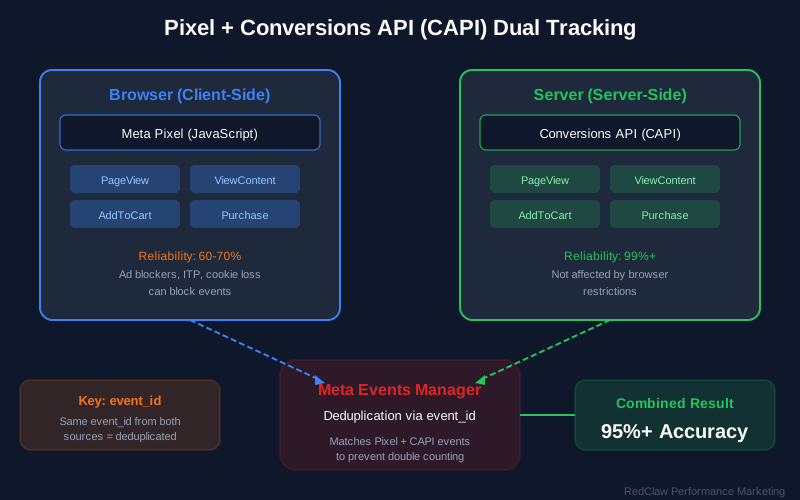
The Privacy-First Challenge
Recent privacy changes have fundamentally impacted tracking accuracy across digital advertising. Understanding these challenges is crucial for implementing effective tracking solutions.
Key Privacy Changes Affecting Tracking:
| Privacy Change | Impact | Affected Devices |
|---|---|---|
| iOS 14.5+ App Tracking Transparency | 20-40% data loss | iPhone, iPad |
| Browser cookie limitations | Reduced attribution windows | All browsers |
| Ad blocker prevalence | 15-25% event blocking | Desktop, mobile |
| Third-party cookie deprecation | Cross-site tracking limits | Chrome, Safari |
| Safari ITP 2.3 | 7-day cookie expiration | Safari users |
| Firefox ETP | Third-party cookie blocking | Firefox users |
Impact on Pixel-Only Tracking:
When relying solely on browser-based Pixel tracking, advertisers experience significant data loss:
- 20-40% data loss on iOS devices due to ATT restrictions
- Inconsistent cross-device attribution as users switch between devices
- Delayed conversion reporting affecting real-time optimization
- Reduced optimization effectiveness due to incomplete conversion signals
- Attribution gaps from browser restrictions and cookie limitations
The Dual Tracking Solution
Dual tracking combines the strengths of both browser-side and server-side tracking to create a comprehensive, resilient measurement system.
Event Capture Architecture:
├── Browser Side (Pixel)
│   ├── JavaScript execution in user's browser
│   ├── Cookie-based user identification
│   ├── Real-time event capture and transmission
│   └── Rich contextual data collection
└── Server Side (CAPI)
    ├── Server-to-server secure transmission
    ├── First-party data enrichment
    ├── Resilient to browser restrictions
    └── Higher match quality potential
Benefits of Dual Tracking Implementation:
| Benefit | Impact | Measurement |
|---|---|---|
| Improved event coverage | +15-30% more events captured | Events Manager comparison |
| Better cross-device attribution | Unified user journey | Attribution reporting |
| More reliable optimization signals | Complete conversion data | Campaign performance |
| Future-proof measurement | Resilient to privacy changes | Long-term data stability |
| Enhanced match quality | More user data points | EMQ scores |
| Reduced ad blocker impact | Server-side backup | Event recovery rate |
How Events Flow in Dual Tracking
Understanding the complete event flow helps ensure proper implementation:
- User Action - Customer performs action (Purchase, Lead form submit, etc.)
- Pixel Fires - Browser captures event via JavaScript
- Server Processes - Your backend captures the same event
- CAPI Sends - Server transmits event data to Meta securely
- Deduplication - Meta matches events and removes duplicates
- Reporting - Accurate, deduplicated attribution in Events Manager
Meta Pixel Setup
Creating Your Pixel
Step 1: Pixel Creation in Events Manager
- Navigate to Meta Events Manager
- Click "Connect Data Sources"
- Select "Web" as your data source
- Name your pixel descriptively (e.g., "YourBrand-Website-Pixel")
- Enter your website URL
- Click "Create" to generate your Pixel ID
Step 2: Choose Installation Method
| Method | Best For | Technical Level | Setup Time |
|---|---|---|---|
| Manual Code | Custom websites | Developer | 1-2 hours |
| Google Tag Manager | GTM↗ users | Intermediate | 30 minutes |
| Partner Integration | Shopify, WooCommerce | Beginner | 15 minutes |
| Meta Business Extension | Simple setups | Beginner | 10 minutes |
Installation Methods Detailed
Option A: Manual Code Installation
Place this base code in the <head> section of every page:
<!-- Meta Pixel Code -->

<noscript>
<img height="1" width="1" style="display:none"
src="https://www.facebook.com/tr?id=YOUR_PIXEL_ID&ev=PageView&noscript=1"/>
</noscript>
<!-- End Meta Pixel Code -->
Option B: Google Tag Manager Implementation
- Create a new tag in your GTM container
- Select "Meta Pixel" tag template or use Custom HTML
- Enter your Pixel ID
- Set trigger to "All Pages" for base code
- Create additional tags for specific events
- Test in Preview mode before publishing
Option C: Partner Integration
| Platform | Integration Method | Native Support |
|---|---|---|
| Shopify | Facebook & Instagram sales channel | Full native |
| WooCommerce | Facebook for WooCommerce plugin | Full native |
| BigCommerce | Built-in integration | Full native |
| Magento | Facebook Business Extension | Extension required |
| Squarespace | Marketing integrations | Limited native |
| Wix | Facebook Pixel app | App required |
Standard Events Configuration
Essential E-commerce Events Priority Matrix:
| Event | Trigger Point | Priority | Optimization Value |
|---|---|---|---|
| PageView | All page loads | Required | Baseline tracking |
| ViewContent | Product detail pages | High | Product interest |
| AddToCart | Add to cart button | High | Purchase intent |
| InitiateCheckout | Checkout page load | High | Conversion funnel |
| Purchase | Order confirmation | Critical | Revenue tracking |
| Search | Search results page | Medium | Intent signals |
| AddToWishlist | Wishlist action | Medium | Engagement |
| Lead | Form submission | High | Lead generation |
| CompleteRegistration | Account creation | Medium | User acquisition |
Event Code Implementation Examples:
// ViewContent - Track product page views
fbq('track', 'ViewContent', {
  content_ids: ['12345'],
  content_type: 'product',
  content_name: 'Premium Widget Pro',
  content_category: 'Widgets > Premium',
  value: 49.99,
  currency: 'USD'
});

// AddToCart - Track cart additions
fbq('track', 'AddToCart', {
  content_ids: ['12345'],
  content_type: 'product',
  value: 49.99,
  currency: 'USD',
  num_items: 1
});

// InitiateCheckout - Track checkout starts
fbq('track', 'InitiateCheckout', {
  content_category: 'Checkout',
  value: 149.97,
  currency: 'USD',
  num_items: 3
});

// Purchase - Track completed transactions
fbq('track', 'Purchase', {
  content_ids: ['12345', '12346', '12347'],
  content_type: 'product',
  value: 149.97,
  currency: 'USD',
  num_items: 3,
  order_id: 'ORDER_12345',
  predicted_ltv: 299.94
});
Custom Events for Advanced Tracking
When to Use Custom Events:
- Specific funnel stages not covered by standard events
- Engagement metrics (scroll depth, time on page)
- B2B lead scoring events
- Subscription lifecycle events
- Content consumption tracking
Custom Event Implementation:
// Trial Started
fbq('trackCustom', 'TrialStarted', {
  plan: 'Pro',
  duration: '14_days',
  value: 0,
  currency: 'USD',
  source: 'homepage_cta'
});

// Content Download
fbq('trackCustom', 'ContentDownload', {
  content_name: 'E-commerce Guide 2026',
  content_type: 'pdf',
  topic: 'conversion-optimization'
});

// Video Engagement
fbq('trackCustom', 'VideoWatched', {
  video_name: 'Product Demo',
  watch_percentage: 75,
  video_length: 180
});
CTA #1: 📊 Need Expert Help? Our team has implemented dual tracking for 500+ businesses. Get a Free Tracking Audit to identify gaps in your current setup and recover lost conversion data.
Conversions API Implementation
Implementation Options Overview
Option 1: Partner Integration (Recommended for Most Businesses)
Partner integrations offer the fastest, most reliable path to CAPI implementation without custom development.
E-commerce Platform Integrations:
| Platform | Integration Type | Setup Complexity | Event Coverage |
|---|---|---|---|
| Shopify | Native sales channel | Low | Full standard events |
| WooCommerce | Official plugin | Low | Full standard events |
| BigCommerce | Built-in feature | Low | Full standard events |
| Magento | Extension | Medium | Full standard events |
| Custom | Direct API | High | Customizable |
Tag Management Solutions:
- Google Tag Manager: Server-side container with CAPI template
- Tealium: EventStream integration with pre-built connectors
- Segment: Destination setup with automatic event mapping
Customer Data Platforms (CDPs):
- mParticle
- Segment Personas
- Tealium AudienceStream
- Lytics
- BlueConic
Option 2: Direct API Integration
For businesses with custom tech stacks or specific requirements, direct API integration provides maximum flexibility.
Requirements:
- Developer resources (backend/API development)
- Server access and infrastructure
- API endpoint capability
- Event processing and queuing logic
- Error handling and retry mechanisms
Basic Python Implementation:
import requests
import hashlib
import json
import time

def hash_data(data):
    """Normalize and hash user data for CAPI"""
    if not data:
        return None
    normalized = str(data).lower().strip()
    return hashlib.sha256(normalized.encode('utf-8')).hexdigest()

def send_capi_event(event_name, event_data, user_data, pixel_id, access_token):
    url = f'https://graph.facebook.com/v18.0/{pixel_id}/events'

    payload = {
        'data': [{
            'event_name': event_name,
            'event_time': int(time.time()),
            'event_source_url': event_data['url'],
            'action_source': 'website',
            'event_id': event_data.get('event_id'),
            'user_data': {
                'em': hash_data(user_data.get('email')),
                'ph': hash_data(user_data.get('phone')),
                'fn': hash_data(user_data.get('first_name')),
                'ln': hash_data(user_data.get('last_name')),
                'ct': hash_data(user_data.get('city')),
                'st': hash_data(user_data.get('state')),
                'zp': hash_data(user_data.get('zip')),
                'country': hash_data(user_data.get('country')),
                'external_id': hash_data(user_data.get('user_id')),
                'client_ip_address': user_data.get('ip_address'),
                'client_user_agent': user_data.get('user_agent'),
                'fbc': user_data.get('fbc'),
                'fbp': user_data.get('fbp')
            },
            'custom_data': {
                'value': event_data.get('value'),
                'currency': event_data.get('currency'),
                'content_ids': event_data.get('content_ids'),
                'content_type': event_data.get('content_type', 'product'),
                'content_name': event_data.get('content_name'),
                'content_category': event_data.get('content_category'),
                'num_items': event_data.get('num_items'),
                'order_id': event_data.get('order_id')
            }
        }],
        'access_token': access_token
    }

    response = requests.post(url, json=payload)
    return response.json()
Access Token Generation
Step 1: Create System User
- Navigate to Meta Business Settings
- Select "System Users" from the left menu
- Click "Add" to create a new system user
- Name the user descriptively (e.g., "CAPI-Server-Integration")
- Assign "Admin" role for full access
Step 2: Generate Access Token
- Select your newly created system user
- Click "Generate New Token"
- Select the appropriate pixel from the dropdown
- Choose permissions: "Ads Management Standard Access"
- Copy the token immediately (it won't be shown again)
- Store securely in your environment variables
Token Security Best Practices:
| Practice | Implementation | Risk Mitigation |
|---|---|---|
| Environment variables | Store in .env files | Prevents code exposure |
| Never commit to repos | Add to .gitignore | Prevents accidental leaks |
| Regular rotation | Rotate every 90 days | Limits breach impact |
| IP allowlisting | Restrict to server IPs | Prevents unauthorized use |
| Access logging | Monitor token usage | Detects suspicious activity |
Event Parameters Reference
Required Parameters for All Events:
| Parameter | Type | Description | Example |
|---|---|---|---|
event_name | String | Standard or custom event name | "Purchase" |
event_time | Integer | Unix timestamp | 1709827200 |
event_source_url | String | Page where event occurred | "https://shop.com/checkout↗" |
action_source | String | Where action happened | "website" |
User Data Parameters (Hashed for Privacy):
| Parameter | Description | Hash Required | Priority |
|---|---|---|---|
em | Email address | Yes | Critical |
ph | Phone number | Yes | Critical |
fn | First name | Yes | High |
ln | Last name | Yes | High |
ct | City | Yes | Medium |
st | State/Province | Yes | Medium |
zp | ZIP/Postal code | Yes | Medium |
country | Country code | Yes | Medium |
external_id | Your user ID | Recommended | High |
client_ip_address | User IP address | No | High |
client_user_agent | Browser user agent | No | High |
fbc | Facebook Click ID | No | Critical |
fbp | Facebook Browser ID | No | Critical |
Hashing Implementation:
import hashlib

def hash_data(data):
    """
    Normalize and hash user data for CAPI compliance.
    Always normalize before hashing for consistent results.
    """
    if not data:
        return None

    # Normalization steps:
    # 1. Convert to string
    # 2. Lowercase
    # 3. Remove leading/trailing whitespace
    normalized = str(data).lower().strip()

    # Additional normalization for specific fields:
    # Phone: Remove non-numeric characters
    # Email: Remove dots before @ for Gmail (optional)

    # Hash with SHA-256
    return hashlib.sha256(normalized.encode('utf-8')).hexdigest()
Event Deduplication
Understanding Deduplication
When both Pixel and CAPI send the same event, Meta uses sophisticated deduplication to ensure conversions are counted accurately without duplication.
Deduplication Flow:
Event 1: Pixel sends Purchase (with event_id: "purchase_123_1709827200")
Event 2: CAPI sends Purchase (with event_id: "purchase_123_1709827200")
Meta Processing: Identifies matching event_ids
Result: Meta counts 1 Purchase (not 2)
Why Deduplication Matters:
- Prevents inflated conversion counts
- Ensures accurate ROAS calculations
- Maintains optimization signal integrity
- Avoids double-charging for conversions
Deduplication Methods
Method 1: Event ID (Recommended)
Assign a unique, consistent ID to each event across both Pixel and CAPI:
Pixel Implementation:
// Generate consistent event ID
const eventId = 'purchase_' + orderId + '_' + Math.floor(Date.now() / 1000);

// Include in Pixel event
fbq('track', 'Purchase', {
  value: 99.99,
  currency: 'USD',
  order_id: 'ORDER_12345'
}, {
  eventID: eventId  // Critical for deduplication
});
CAPI Implementation:
import time

# Generate the same event ID format
event_id = f'purchase_{order_id}_{int(time.time())}'

payload = {
    'data': [{
        'event_name': 'Purchase',
        'event_time': int(time.time()),
        'event_id': event_id,  # Must match Pixel eventID
        # ... other parameters
    }]
}
Method 2: External ID + Timestamp
Meta can deduplicate using the combination of external_id and event_time:
- External ID: Your unique user identifier
- Event time: Unix timestamp (must be within 48 hours)
# Alternative deduplication method
payload = {
    'data': [{
        'event_name': 'Purchase',
        'event_time': int(time.time()),
        'user_data': {
            'external_id': hash_data(user_id),  # Your user ID
        },
        # Meta matches events with same external_id + event_time
    }]
}
Deduplication Best Practices
| Best Practice | Implementation | Benefit |
|---|---|---|
| Always use Event IDs | Include event_id in both Pixel and CAPI | Most reliable deduplication |
| Consistent naming | Use predictable format: {event}{order}{timestamp} | Easy debugging |
| Include transaction ID | Add order_id to event_id | Unique per transaction |
| Timestamp precision | Use exact event time | Prevents false duplicates |
| 48-hour window | Events deduplicate within 48 hours | Prevents stale deduplication |
| Test thoroughly | Verify deduplication in Events Manager | Ensures accuracy |
CTA #2: 🚀 Maximize Your Tracking Accuracy Download our free Dual Tracking Implementation Checklist with step-by-step setup instructions, code templates, and validation tests for Pixel + CAPI.
Event Match Quality
Understanding Event Match Quality (EMQ)
Event Match Quality measures how effectively Meta can match your events to platform users. Higher scores mean better attribution and optimization.
EMQ Scoring Scale:
| Score | Rating | Impact on Campaigns | Action Required |
|---|---|---|---|
| 9-10 | Excellent | Optimal optimization, lowest CPA | Maintain current setup |
| 7-8.9 | Good | Strong performance, good attribution | Minor improvements possible |
| 5-6.9 | Fair | Reduced optimization effectiveness | Add more user data fields |
| Below 5 | Poor | Significant performance impact | Immediate optimization needed |
Improving Match Quality
1. Send Maximum User Data
The more user data parameters you send, the higher your match quality:
# Complete user data payload for maximum EMQ
user_data = {
    # Critical fields (highest impact on matching)
    'em': hash_email(user.email),           # Email - Most important
    'ph': hash_phone(user.phone),           # Phone - Most important
    'fbc': get_fbc_cookie(),                # Click ID - Critical
    'fbp': get_fbp_cookie(),                # Browser ID - Critical

    # High-impact fields
    'fn': hash_name(user.first_name),       # First name
    'ln': hash_name(user.last_name),        # Last name
    'external_id': hash_string(user.id),    # Your user ID
    'client_ip_address': request.ip,        # IP address
    'client_user_agent': request.user_agent, # User agent

    # Medium-impact fields
    'ct': hash_string(user.city),           # City
    'st': hash_string(user.state),          # State
    'zp': hash_string(user.zip),            # ZIP code
    'country': hash_string(user.country)    # Country
}
2. Capture Click IDs (fbc)
The Facebook Click ID is crucial for attributing conversions to specific ads:
// Extract fbc from URL parameter
function getFbc() {
    const params = new URLSearchParams(window.location.search);
    const fbclid = params.get('fbclid');

    if (fbclid) {
        // Format: fb.1.{timestamp}.{fbclid}
        return 'fb.1.' + Date.now() + '.' + fbclid;
    }

    // Check for existing cookie
    return getCookie('_fbc');
}

// Store in cookie for persistence
document.cookie = '_fbc=' + getFbc() + '; path=/; max-age=7776000; SameSite=None; Secure';
3. Capture Browser ID (fbp)
The Facebook Browser ID helps with cross-session matching:
// Pixel automatically sets _fbp cookie
// Include in CAPI payload:
function getFbp() {
    return getCookie('_fbp');  // Format: fb.1.{creation_time}.{random_number}
}

// Send to CAPI
'fbp': getFbp()
Monitoring Match Quality
Events Manager Dashboard:
- Navigate to Meta Events Manager
- Select your pixel from the data sources
- Click the "Event Match Quality" tab
- Review scores by individual event type
- Identify events with low scores
Improvement Action Plan:
| Issue | Solution | Expected Impact |
|---|---|---|
| Missing email | Add email capture to checkout | +1-2 EMQ points |
| Missing phone | Include phone in user data | +0.5-1 EMQ points |
| No fbc/fbp | Implement click ID capture | +1-3 EMQ points |
| Low parameter count | Add location data | +0.5-1 EMQ points |
| Hashing errors | Verify SHA-256 implementation | Fixes data rejection |
Testing and Validation
Testing Tools Overview
1. Meta Pixel Helper (Chrome Extension)
The Pixel Helper is your first line of defense for testing:
- Real-time pixel firing verification
- Event parameter inspection
- Error identification and troubleshooting
- Event ID confirmation
2. Events Manager Test Events
Built-in testing environment:
- Go to Meta Events Manager
- Select "Test Events" tab
- Enter your website URL
- Perform actions on your site
- Verify events appear in real-time
- Check parameters and deduplication
3. Conversions API Testing
Using Graph API Explorer:
- Navigate to developers.facebook.com/tools/explorer
- Select your app from the dropdown
- Generate or use existing access token
- Use POST to
/{PIXEL_ID}/events - Send test payload
- Verify response and event reception
Validation Checklist
Pixel Validation:
| Check | Method | Expected Result |
|---|---|---|
| Base code installation | View page source | Pixel code in <head> |
| PageView firing | Pixel Helper | PageView event detected |
| Standard events | Trigger events | Events fire correctly |
| Parameters | Pixel Helper details | All parameters populated |
| Custom events | Trigger custom actions | Custom events working |
| Console errors | Browser DevTools | No JavaScript errors |
CAPI Validation:
| Check | Method | Expected Result |
|---|---|---|
| Events sending | API response | HTTP 200 status |
| Response validation | Response body | No error messages |
| Rate limits | Response headers | Within limits |
| Event IDs unique | Payload inspection | Unique per event |
| User data hashed | Payload inspection | SHA-256 hashes present |
| Deduplication | Events Manager | Events deduplicated |
Dual Tracking Validation:
| Check | Method | Expected Result |
|---|---|---|
| Same events both sources | Events Manager | Events from Pixel + CAPI |
| Deduplication working | Event counts | No double-counting |
| Match quality | EMQ scores | 7+ for all events |
| Conversion values | Purchase events | Accurate value reporting |
| Attribution | Conversion paths | Correct ad attribution |
Common Testing Scenarios
Test 1: Basic Event Firing
1. Visit product page
2. Verify ViewContent fires (Pixel + CAPI)
3. Check content_ids, value, currency accuracy
4. Confirm event_id present in both
Test 2: Complete Purchase Flow
1. Add product to cart
2. Verify AddToCart event fires
3. Proceed to checkout
4. Verify InitiateCheckout event
5. Complete purchase
6. Verify Purchase event with all parameters
7. Confirm deduplication in Events Manager
Test 3: Cross-Browser and Privacy
1. Test in Chrome, Safari, Firefox, Edge
2. Test with ad blockers enabled
3. Test in incognito/private mode
4. Test on iOS Safari (with ATT)
5. Verify CAPI captures events Pixel misses
Advanced Configuration
Offline Conversions
Use Cases for Offline Conversions:
- Phone orders and sales
- In-store purchases
- CRM-qualified leads
- Subscription renewals
- Quote-to-sale conversions
Implementation Methods:
| Method | Best For | Setup Time |
|---|---|---|
| Manual Upload | Occasional offline events | 10 minutes |
| Scheduled Upload | Regular offline data | 1 hour setup |
| Offline Conversions API | Real-time integration | 4-8 hours |
| Partner Integration | CRM-connected businesses | 1-2 hours |
Offline Events Process:
- Collect offline conversion data (customer info, timestamp, value)
- Format according to Meta's offline event schema
- Upload via Events Manager or API
- Meta matches to ad exposure
- Attribution appears in reporting
Value Optimization
Requirements for Value Optimization:
- Minimum purchase value data in events
- Sufficient conversion volume (50+ per week)
- Consistent value parameter formatting
- Value-based lookalike audiences
Configuration for Value Optimization:
// Send detailed purchase value data
fbq('track', 'Purchase', {
    value: order_total,           // Total order value
    currency: 'USD',              // ISO currency code
    contents: products.map(p => ({
        id: p.id,                 // Product SKU
        quantity: p.quantity,     // Items purchased
        item_price: p.price       // Unit price
    })),
    predicted_ltv: ltv_estimate   // Optional: predicted lifetime value
});
Advanced Matching Configuration
Automatic Advanced Matching (Pixel):
// Enable automatic advanced matching
fbq('init', 'YOUR_PIXEL_ID', {
    em: 'user@example.com',       // Pre-populated email
    ph: '+15551234567'            // Pre-populated phone
}, {
    autoConfig: true,             // Enable automatic matching
    debug: false                  // Set true for debugging
});
Manual Advanced Matching:
// Pass known user data on init
fbq('init', 'PIXEL_ID', {
    em: hashedEmail,              // SHA-256 hashed email
    ph: hashedPhone,              // SHA-256 hashed phone
    fn: hashedFirstName,          // SHA-256 hashed first name
    ln: hashedLastName,           // SHA-256 hashed last name
    external_id: userId           // Your internal user ID
});
Troubleshooting
Pixel Issues and Solutions
Pixel Not Firing:
| Symptom | Cause | Solution |
|---|---|---|
| No events in Pixel Helper | Code not installed | Verify code in page source |
| Wrong Pixel ID | Copy/paste error | Double-check Pixel ID |
| JavaScript errors | Conflicting scripts | Check browser console |
| Events intermittent | Loading order issues | Move pixel higher in <head> |
Events Not Showing in Events Manager:
| Symptom | Cause | Solution |
|---|---|---|
| Events missing | Processing delay | Wait 20-30 minutes |
| Filtered events | Event filtering | Check filter settings |
| Wrong event names | Naming mismatch | Verify standard event names |
| Data errors | Parameter issues | Check Events Manager errors |
Parameter Issues:
| Symptom | Cause | Solution |
|---|---|---|
| Missing parameters | Code errors | Verify all required fields |
| Wrong data types | Type mismatches | Ensure correct types |
| Invalid currency | Wrong format | Use ISO 4217 codes |
| Formatting errors | Syntax issues | Validate JSON/JavaScript |
CAPI Issues and Solutions
API Errors:
| Error | Cause | Solution |
|---|---|---|
| 401 Unauthorized | Invalid token | Regenerate access token |
| 403 Forbidden | Permission issues | Check system user permissions |
| 400 Bad Request | Malformed payload | Validate JSON structure |
| 429 Rate Limited | Too many requests | Implement rate limiting |
| 500 Server Error | Meta issue | Retry with exponential backoff |
Low Match Quality:
| Symptom | Cause | Solution |
|---|---|---|
| EMQ below 5 | Missing user data | Add more user parameters |
| Hashing failures | Wrong hash format | Verify SHA-256 implementation |
| Missing fbc/fbp | Cookie not captured | Implement click ID tracking |
| Poor matching | Data quality issues | Normalize data before hashing |
Deduplication Failures:
| Symptom | Cause | Solution |
|---|---|---|
| Double counting | Event IDs don't match | Sync event ID generation |
| Missing dedup | No event_id provided | Add event_id to all events |
| Timestamp mismatch | Clock skew | Use server time consistently |
| Wrong event names | Name mismatch | Ensure identical event names |
Data Discrepancies
Pixel vs. CAPI Differences:
| Observation | Explanation | Action |
|---|---|---|
| CAPI higher than Pixel | Expected (15-30%) | Normal, indicates good setup |
| Pixel higher than CAPI | CAPI implementation issue | Debug CAPI configuration |
| Large discrepancy | Deduplication failure | Check event_id matching |
| Missing CAPI events | API errors | Check error logs |
Meta vs. Analytics Differences:
| Factor | Impact | Mitigation |
|---|---|---|
| Attribution models | Different credit assignment | Understand model differences |
| Tracking methods | Pixel vs. analytics | Both have limitations |
| Timezone differences | Reporting misalignment | Align timezone settings |
| Filtering variations | Different bot filtering | Compare filtered vs. unfiltered |
CTA #3: 💬 Stuck on Implementation? Join our Meta Advertising Community for expert support, or schedule a consultation with our certified Meta tracking specialists.
Internal Linking Recommendations
To maximize SEO value and user experience, link to these related articles within your content:
- Meta Ads↗ Strategy 2026 - Link from "effective Meta advertising" and "campaigns optimize"
- Conversion Rate Optimization Guide - Link from "conversion tracking" and "ROAS"
- iOS 14+ Tracking Solutions - Link from "iOS 14.5" and "privacy changes"
- Google Analytics↗ 4 Setup - Link from "analytics" and "attribution"
- Server-Side Tagging Guide - Link from "server-side tracking" and "GTM"
- Meta Attribution Models - Link from "attribution" and "attribution windows"
- E-commerce Tracking Best Practices - Link from "e-commerce" and "purchase events"
FAQ
1. What is the difference between Meta Pixel and Conversions API?
Meta Pixel is a browser-side JavaScript snippet that tracks user actions directly in the browser. It captures events in real-time but is vulnerable to ad blockers, browser restrictions, and privacy settings.
Conversions API (CAPI) is a server-side solution that sends event data directly from your server to Meta. It's more resilient to privacy changes and browser limitations, providing a backup data stream that typically captures 15-30% more events than Pixel alone.
Best Practice: Use both together (dual tracking) for maximum coverage and reliability.
2. Do I need a developer to implement Conversions API?
Not necessarily. You have several options based on your technical resources:
- No-code options: Shopify, WooCommerce, and BigCommerce have native integrations that require no coding
- Low-code options: Google Tag Manager server-side containers can be configured with minimal technical knowledge
- Developer required: Custom websites or direct API integration require backend development
For most businesses using major e-commerce platforms, you can implement CAPI without hiring a developer.
3. How does event deduplication work?
Event deduplication prevents the same conversion from being counted twice when both Pixel and CAPI send the same event. Meta uses two methods:
- Event ID matching: When both sources send an event with the same
event_id, Meta counts it once - External ID + Timestamp: Meta can match events using the combination of
external_idandevent_timewithin a 48-hour window
Implementation: Always include a unique, consistent event_id in both your Pixel and CAPI events for reliable deduplication.
4. What is Event Match Quality and why does it matter?
Event Match Quality (EMQ) is a score from 0-10 that measures how effectively Meta can match your events to platform users. Higher scores mean:
- Better attribution of conversions to ads
- More effective campaign optimization
- Lower cost per acquisition
- More accurate audience building
Target Scores:
- 9-10: Excellent (optimal performance)
- 7-8.9: Good (strong performance)
- 5-6.9: Fair (needs improvement)
- Below 5: Poor (significant impact on campaigns)
5. How long does it take to implement dual tracking?
Implementation timelines vary by method:
| Method | Setup Time | Testing Time | Total |
|---|---|---|---|
| Shopify/WooCommerce native | 15-30 min | 1-2 hours | 2-3 hours |
| Google Tag Manager | 1-2 hours | 2-4 hours | 3-6 hours |
| Direct API integration | 4-8 hours | 4-8 hours | 8-16 hours |
| Custom development | 1-2 weeks | 1 week | 2-3 weeks |
Important: Always allow time for thorough testing before relying on data for optimization.
6. Will dual tracking improve my ROAS?
Yes, typically by 10-25%. Here's why:
- More complete data: CAPI recovers 15-30% of events lost to privacy restrictions
- Better optimization: Complete conversion signals improve algorithm performance
- Accurate attribution: Proper deduplication ensures correct credit assignment
- Future-proofing: Resilient to ongoing privacy changes
Most businesses see measurable improvement in campaign performance within 2-4 weeks of proper dual tracking implementation.
7. What user data should I send to maximize match quality?
Critical fields (highest impact):
- Email address (hashed)
- Phone number (hashed)
- Facebook Click ID (fbc)
- Facebook Browser ID (fbp)
High-impact fields:
- First and last name (hashed)
- External ID (your user ID)
- IP address
- User agent
Medium-impact fields:
- City, state, ZIP, country (all hashed)
Important: All personally identifiable information must be hashed using SHA-256 before sending to Meta.
8. How do I test if my dual tracking is working correctly?
Step-by-step testing process:
- Install Meta Pixel Helper Chrome extension
- Use Events Manager Test Events to monitor in real-time
- Trigger test events on your website (view product, add to cart, purchase)
- Verify events appear from both Pixel and CAPI sources
- Check deduplication - events should not be double-counted
- Validate parameters - all values should be accurate
- Review Event Match Quality scores in Events Manager
- Test across browsers including Safari with privacy settings
9. What are the costs associated with Conversions API?
Direct costs:
- API calls: Free (no cost per event sent)
- Server resources: Minimal (events are lightweight HTTP requests)
- Development time: Varies by implementation method
Potential indirect costs:
- Server-side GTM: If using, may require Google Cloud hosting ($)
- Developer time: For custom implementations
- CDP costs: If using a Customer Data Platform
ROI: The improvement in tracking accuracy typically pays for any implementation costs within the first month through improved campaign performance.
10. How do privacy changes like iOS 14.5+ affect dual tracking?
Impact on Pixel-only tracking:
- 20-40% data loss on iOS devices due to App Tracking Transparency
- Limited attribution windows (7-day click, 1-day view)
- Reduced event matching accuracy
How dual tracking helps:
- CAPI bypasses browser restrictions by sending data server-side
- First-party data is less affected by privacy changes
- Higher match quality through server-side user data
- More reliable optimization signals for campaigns
Future outlook: As privacy restrictions continue to tighten, dual tracking becomes increasingly essential for accurate measurement.
Conclusion
Dual tracking with Meta Pixel and Conversions API is no longer optional—it's essential for accurate measurement and effective optimization in 2026's privacy-first landscape.
Key Takeaways:
- Implement Both Sources: Browser + server-side tracking provides maximum coverage and resilience
- Configure Deduplication: Use consistent
event_idvalues to prevent double-counting - Optimize Match Quality: Send maximum user data parameters for better attribution
- Test Thoroughly: Validate all events across multiple browsers and scenarios
- Monitor Continuously: Regular health checks ensure ongoing data quality
Implementation Priority:
| Priority | Action | Timeline |
|---|---|---|
| 1 | Verify Pixel installation | Week 1 |
| 2 | Implement CAPI (partner integration) | Week 1-2 |
| 3 | Configure event deduplication | Week 2 |
| 4 | Optimize match quality | Week 2-3 |
| 5 | Test and validate | Week 3 |
| 6 | Monitor and refine | Ongoing |
The investment in proper dual tracking setup pays dividends through improved optimization, accurate attribution, and future-proof measurement that withstands ongoing privacy changes.
Need help implementing dual tracking? RedClaw Performance specializes in Pixel + CAPI setup and optimization for maximum tracking accuracy. Our certified Meta experts have implemented dual tracking for 500+ businesses across e-commerce, SaaS, and lead generation verticals.
Related Resources:
- Meta Events Manager↗
- Conversions API Documentation↗
- Event Deduplication Guide↗
- Event Match Quality Best Practices↗
Last Updated: March 9, 2026
Categories: Meta Advertising, Conversion Tracking, Server-Side Tracking
Tags: Meta Pixel, Conversions API, CAPI, Dual Tracking, Event Deduplication, Event Match Quality, Facebook Pixel, Server-Side Tracking
Related Posts
iGaming Social Media Marketing: Complete Guide to Brand Growth & Player Engagement in 2026
Master iGaming social media marketing with proven strategies for Facebook, Instagram, Twitter, Telegram & more. Learn content creation, engagement tactics, compliance guidelines & build a high-converting social media system.
iGaming Audience Targeting: Advanced Lookalike Strategies for 2026
Master advanced Lookalike Audience strategies for iGaming advertising. Learn seed audience optimization, layering techniques, and signal-based targeting to maximize player acquisition ROAS.
Meta Ads Trends 2026: 7 Changes Every Advertiser Must Know
2026 Meta Ads trends: AI automation, Advantage+ expansion, Threads Ads, privacy-first attribution. Actionable strategies for e-commerce, iGaming & SaaS.