
advertising
Meta Ads Complete Guide 2026: Setup, Targeting, Optimization + Real ROAS Data
- RedClaw Performance Team
- RedClaw Performance Team
- Date
- Reading time
- 56 min read
Meta Ads↗ Guide 2026: From $0 to 5x ROAS (Step-by-Step)
Meta Ads in 2026 has evolved into a sophisticated AI-driven advertising ecosystem that rewards advertisers who understand its mechanics deeply. According to Meta's official Ads Manager documentation↗, the platform now offers over 11 campaign objectives across six major advertising surfaces. This comprehensive Facebook advertising tutorial covers everything from foundational campaign setup to advanced optimization strategies, real-world budget scenarios, and the latest Advantage+ and GenAI features. Whether you are new to Meta advertising or looking to scale existing campaigns from $1,000/month to $20,000/month and beyond, this guide provides the actionable, step-by-step framework you need.
TL;DR — The complete Meta Ads guide for 2026. Key takeaways:
- Advantage+ Shopping is now the default for e-commerce — manual campaigns still work for niche targeting
- Pixel + CAPI dual tracking is non-negotiable — single Pixel loses 30-40% of conversions on iOS
- Budget rule of thumb: Start at $20/day CBO, don't touch for 7 days, then scale 20-30% weekly
- Creative > targeting in 2026 — Meta's AI handles targeting; your job is feeding it good creative Time to read: 35 minutes | Skill level: Beginner to Advanced | Last updated: March 2026
Not sure where your Meta Ads budget is leaking? Get a free ad account audit — we'll identify your top 3 optimization opportunities in 48 hours.
RedClaw Key Insight: Based on RedClaw's analysis of 200+ managed ad accounts, Advantage+ Shopping Campaigns deliver 32% higher ROAS than manual setups on average. The critical threshold is 50+ conversion events per week for machine learning to fully optimize.
Quick Stat: Advertisers using Advantage+ Shopping Campaigns see an average 17% improvement in CPA compared to manual campaigns. Combined with CAPI dual tracking, top performers achieve 30-50% lower acquisition costs than industry benchmarks.
Table of Contents
- Understanding the 2026 Meta Ads Landscape
- The Meta Ads Marketing Funnel
- Account Setup & Structure
- Step-by-Step Campaign Creation
- AI-Powered Campaign Types & 2026 Features
- Creative Strategy for 2026
- Advanced Targeting
- Conversion Tracking: Pixel + CAPI Deep Dive
- The Learning Phase Explained
- Budget Allocation: Real-World Scenarios
- Optimization Best Practices
- Reporting & Analytics
- Common Pitfalls to Avoid
- Meta Ads FAQ
5-Minute Quick Start: Your First Meta Ad
If you have never run a Meta Ad before and want to get something live today, here is the fastest path from zero to your first impression. This quick start strips away the complexity and gives you the absolute minimum viable campaign. You can refine everything later using the advanced strategies in this guide.
Step 1: Create a Business Portfolio. Go to business.facebook.com↗ and set up your business account. Link your Facebook Page and Instagram profile. This takes about 60 seconds if you already have a Facebook account.
Step 2: Install the Meta Pixel. Navigate to Events Manager, create a new Pixel, and add the base code to your website header. If you use Shopify, WooCommerce, or WordPress, use the one-click integration instead of manual code. Verify the Pixel fires by visiting your site and checking the green checkmark in Events Manager.
Step 3: Create your campaign. Open Ads Manager↗, click the green "+ Create" button, and select "Sales" as your objective. Turn on Campaign Budget Optimization (CBO) and set a daily budget of $20. This is enough to start generating data without significant financial risk.
Step 4: Set up your ad set. For targeting, select your country only --- leave everything else broad. Choose "Advantage+ Placements" so Meta delivers your ad across Facebook, Instagram, Stories, and Reels automatically. Set the conversion event to "Purchase" (or "Add to Cart" if you are a new store with no purchase history).
Step 5: Build your first ad. Upload one vertical video (9:16) or one square image (1:1). Write a primary text of 2-3 sentences describing your offer, a short headline under 40 characters, and select the "Shop Now" button. Add your landing page URL with basic UTM parameters. Hit publish.
What happens next? Your ad enters Meta's review process (usually approved within 1-2 hours). Once live, resist the urge to change anything for at least 7 days. The algorithm needs time to learn who responds to your ad and optimize delivery accordingly. Check back in one week with real data to make your first optimization decisions.
Want to do it right? Keep reading for the full strategy below. The rest of this guide covers everything from advanced targeting and dual tracking setup to budget scaling frameworks and creative testing methodology that will turn this basic campaign into a profitable growth engine.
Understanding the 2026 Meta Ads Landscape
The AI-First Revolution in Facebook Advertising
Meta Ads (formerly Facebook Ads) has fundamentally shifted from manual optimization to AI-driven delivery. This transformation represents the biggest change in Facebook advertising since the platform's inception. Understanding this shift is crucial for any campaign setup in 2026.
According to Statista's social media advertising report↗, global social media ad spending is projected to exceed $276 billion in 2026. The platform now processes over 10 trillion data signals per day to determine which ads to show to which users. Manual micro-targeting that worked in 2020-2023 now actively hurts performance because it restricts the algorithm's ability to find ideal customers. Advertisers who embrace this shift are seeing 20-40% better results than those clinging to legacy approaches.
Key changes in 2026 include:
- Advantage+ Shopping Campaigns: AI handles targeting, placement, and creative optimization automatically, delivering consistently better ROAS for e-commerce advertisers. Meta Business Suite↗ now integrates these campaigns directly into its unified management interface
- GenAI Creative Tools: Meta's built-in generative AI produces ad variations, background replacements, and copy alternatives directly within Ads Manager
- Simplified Campaign Structure: Fewer ad sets, broader audiences, more creative variants -- the algorithm performs best with consolidation
- Creative-First Approach: The algorithm prioritizes engaging creative over granular targeting, making creative quality the single highest-leverage variable
- Automated Rules & AI Bidding: Machine learning manages budget allocation, bid optimization, and performance thresholds in real time
Meta vs Google vs TikTok: Which Platform Should You Choose?
Before investing heavily in Meta Ads, it is worth understanding how the platform compares to its two biggest competitors. Each platform excels in different areas, and the best advertising strategy for most businesses involves a multi-platform approach with Meta as the primary demand generation engine.
| Factor | Meta Ads | Google Ads↗ | TikTok Ads↗ |
|---|---|---|---|
| Best Use Case | Demand generation, brand building, retargeting | Intent capture, search, shopping | Trend-driven awareness, Gen Z reach |
| Average CPC | $0.50 - $2.00 | $1.00 - $5.00 (Search), $0.30 - $1.50 (Display) | $0.30 - $1.50 |
| Learning Curve | Moderate --- Advantage+ simplifies setup | Steep --- keyword research and bidding complexity | Low to moderate --- creative-heavy |
| Creative Requirements | High --- diverse formats, continuous refresh needed | Low (Search), Moderate (Display/Video) | Very High --- native, trend-driven video essential |
| Audience Precision | Best-in-class behavioral and lookalike targeting | Unmatched intent signals via search queries | Growing --- interest and behavioral targeting |
| Minimum Monthly Budget | $600 ($20/day) for meaningful data | $900 ($30/day) for competitive keywords | $600 ($20/day) for initial testing |
| Best Industries | E-commerce, DTC, SaaS, lead gen, entertainment | B2B, local services, high-intent retail | Fashion, beauty, food, entertainment, Gen Z products |
When Meta Ads is the clear winner: You need to build demand for a product people do not yet know they want. Meta's AI-driven delivery system excels at finding potential customers based on behavioral signals, even when those customers have never searched for your product category. The combination of sophisticated lookalike audiences, dynamic product ads, and the massive reach across Facebook, Instagram, Reels, Stories, and now Threads makes Meta the top choice for full-funnel advertising.
When to complement with Google: If your product solves an active problem people search for (plumbers, lawyers, specific software categories), Google captures that high-intent traffic more efficiently. The optimal approach is to use Meta for awareness and consideration, then capture converters through Google Search.
When to add TikTok: If your target audience skews under 35 and your product lends itself to visual, trend-driven storytelling, allocate 10-20% of your budget to TikTok. But note that TikTok's ad platform lacks the measurement sophistication and AI automation that Meta offers in 2026. For a detailed comparison, see our Meta vs TikTok for iGaming advertisers.
For most businesses, the recommended starting split is 60% Meta, 30% Google, and 10% TikTok --- adjusting based on your specific audience demographics, product type, and performance data. Use our Budget Planner to model different allocation scenarios.
Why This Meta Ads Tutorial Matters
The Meta advertising landscape has changed dramatically. Advertisers who fail to adapt to AI-driven optimization are seeing their costs increase by 20-50% year-over-year while results decline. Meanwhile, advertisers who restructure their accounts around the principles in this guide are achieving record-low CPAs and record-high ROAS. This tutorial provides the complete framework needed to thrive in the new ecosystem.
For a broader view of where the platform is heading, see our 2026 Meta Ads Trends Forecast covering emerging features, privacy changes, and strategic predictions.
Platform Priorities for Meta Advertising Success
| Priority | Impact | Action Required | Timeline |
|---|---|---|---|
| Creative Quality | High | Invest in diverse creative production | Ongoing |
| Signal Quality | Critical | Implement CAPI + Pixel dual tracking | Week 1 |
| Broad Targeting | Medium | Reduce audience restrictions | Immediate |
| Campaign Simplification | High | Consolidate ad sets, test more creative | Week 2 |
| Value Optimization | High | Set up value-based bidding | Week 1 |
| GenAI Adoption | Medium | Test AI-generated creative variants | Week 3 |
Pro Tip: Advertisers who implement CAPI within the first week of campaign setup see 13% better attribution on average. Our Pixel + CAPI Dual Tracking Setup Guide walks you through every step.
The Meta Ads Marketing Funnel
Before building any campaign, you need to understand how Meta Ads maps to the classic marketing funnel. Each stage requires different objectives, creative approaches, and success metrics.

Top of Funnel (TOFU) -- Awareness
At the awareness stage, your goal is reaching new potential customers who have never heard of your brand. Meta excels here because of its massive reach across Facebook, Instagram, Messenger, and the Audience Network.
Campaign Objectives: Brand Awareness, Reach, Video Views Creative Style: Educational content, entertaining videos, thought leadership Key Metrics: CPM (Cost Per 1,000 Impressions), Video ThruPlay Rate, Reach Typical Budget Allocation: 20-30% of total ad spend
Middle of Funnel (MOFU) -- Consideration
Users at this stage are aware of your brand but have not yet committed. Your job is to build trust, demonstrate value, and move them toward a purchase decision.
Campaign Objectives: Traffic, Engagement, Lead Generation Creative Style: Product demos, comparison content, testimonials, case studies Key Metrics: CTR, CPC, Cost Per Lead, Landing Page View Rate Typical Budget Allocation: 20-30% of total ad spend
Bottom of Funnel (BOFU) -- Conversion
This is where revenue happens. Users are ready to buy -- they just need the final push. Retargeting and dynamic product ads dominate this stage.
Campaign Objectives: Sales, Conversions, Catalog Sales Creative Style: Offers, urgency messaging, social proof, dynamic product ads Key Metrics: ROAS, CPA, Conversion Rate, Purchase Value Typical Budget Allocation: 40-60% of total ad spend
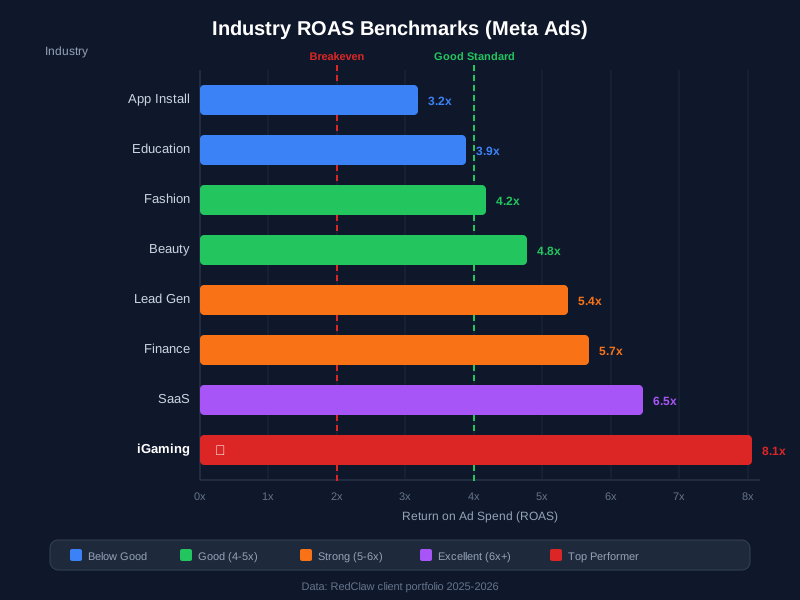
Use our free ROAS Calculator to benchmark your bottom-of-funnel performance against industry averages, and check e-commerce Meta Ads benchmarks for the latest CPA and ROAS data.
Post-Purchase -- Retention & Loyalty
Often overlooked, this stage uses Meta Ads to turn one-time buyers into repeat customers. It is far cheaper to retain an existing customer than to acquire a new one.
Campaign Objectives: Sales (upsell/cross-sell), Engagement Creative Style: Loyalty offers, new product announcements, VIP exclusives Key Metrics: Repeat Purchase Rate, Customer Lifetime Value, ROAS Typical Budget Allocation: 5-10% of total ad spend
Account Setup & Structure
Business Manager Configuration for Meta Ads
Proper account setup is the foundation of successful Facebook advertising. A poorly structured account limits the algorithm's ability to optimize and makes scaling nearly impossible. Follow these steps to configure your Business Manager correctly:
Step 1: Create Business Portfolio
- Navigate to business.facebook.com
- Verify your business identity with official documents (business license, utility bill, or articles of incorporation)
- Set up two-factor authentication for all admin users -- this is now mandatory for ad accounts spending over $10,000/month
- Configure billing thresholds and payment methods (credit card recommended over PayPal for uninterrupted delivery)
Step 2: Asset Organization
Business Portfolio
├── Ad Accounts (organized by region/brand/product line)
├── Pages (Facebook + Instagram profiles)
├── Pixels (one per website/domain)
├── Catalogs (for dynamic product ads)
├── Datasets (for CAPI server events)
└── Apps (for mobile app advertising)
Step 3: User Permissions Matrix
| Role | Access Level | Best For |
|---|---|---|
| Admin | Full control | Business owners, marketing directors |
| Advertiser | Campaign management | Media buyers, campaign managers |
| Analyst | Reporting access only | Data analysts, stakeholders |
| Finance | Billing management | Accounting teams |
| Moderator | Community management | Social media managers |
Recommended Meta Ads Account Structure
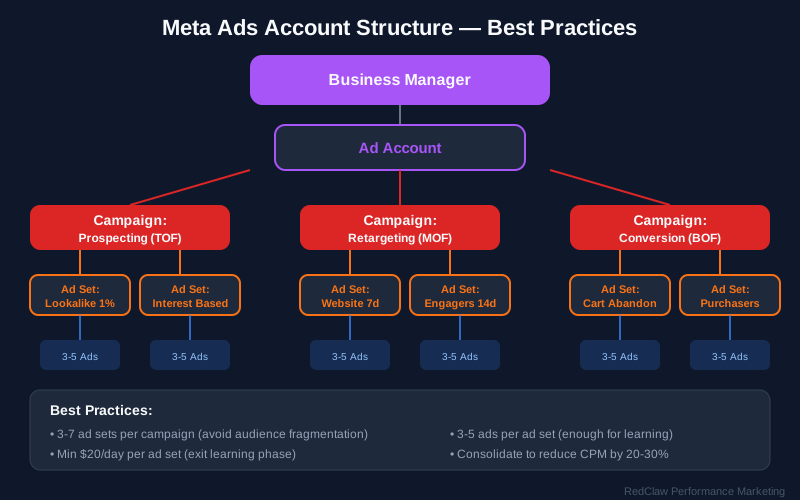
2026 Best Practice: Campaign, Ad Set, Ad -- Keep It Simple
The modern Meta advertising structure emphasizes simplicity. Complex account structures from 2020-2024 with dozens of ad sets targeting micro-segments actually hurt performance in the AI-driven era. The algorithm needs consolidated data to learn efficiently.
Campaign (Objective: Sales)
├── Ad Set 1: Prospecting - Product Category A (Broad Targeting)
│   ├── Ad 1: Video - UGC Style (15s)
│   ├── Ad 2: Video - Product Demo (30s)
│   ├── Ad 3: Carousel - Features & Benefits
│   ├── Ad 4: Static Image - Lifestyle Shot
│   └── Ad 5: Reel - Trending Format
├── Ad Set 2: Prospecting - Product Category B (Broad Targeting)
│   └── [Similar creative structure with 5-8 ads]
└── Ad Set 3: Retargeting (Custom Audiences - 30 Day Window)
    ├── Ad 1: Dynamic Product Ad
    ├── Ad 2: Testimonial Video
    └── Ad 3: Limited-Time Offer
Key Structural Principles:
- Limit to 3-5 ad sets per campaign to consolidate learning data
- Use broad targeting for prospecting (country or region level only)
- Test 5-10 creative assets per ad set so the algorithm can find winners
- Separate prospecting and retargeting into different campaigns
- Each ad set should target a minimum of 50 conversions per week -- if it cannot, consolidate further
For more on how ad creative impacts this structure, read our Ad Creative Design Principles guide.
Struggling with campaign structure? Our team manages $2M+/month in Meta Ad spend across 50+ accounts. See how we structure campaigns for 5x ROAS.
Step-by-Step Campaign Creation
This section walks you through creating a complete Meta Ads campaign from scratch. We will build a Sales campaign optimized for purchases -- the most common and highest-value campaign type.
Step 1: Create the Campaign
- Open Meta Ads Manager↗ (adsmanager.facebook.com)
- Click the green + Create button in the top-left corner
- Choose your campaign objective:
- For e-commerce: select Sales
- For lead generation: select Leads
- For app installs: select App Promotion
- For brand awareness: select Awareness
- Name your campaign using a consistent naming convention:
[Brand] - [Objective] - [Target] - [Date] Example: RedClaw - Sales - US Prospecting - Mar2026 - Campaign-Level Settings:
- Campaign Budget Optimization (CBO): Turn ON -- this lets Meta distribute budget across ad sets automatically based on performance
- A/B Test: Leave OFF for standard campaigns (use the Experiments tool separately)
- Buying Type: Auction (default for most advertisers)
- Special Ad Categories: Select if applicable (housing, employment, credit, or social issues)
Step 2: Configure the Ad Set
The ad set level controls WHO sees your ads, WHEN they see them, and WHERE they appear.
- Conversion Location: Select "Website" (or "Website and App" if applicable)
- Performance Goal: "Maximize number of conversions" or "Maximize conversion value" (use value-based optimization if you have varied product prices)
- Pixel/Dataset: Select your Meta Pixel and choose the "Purchase" event as your conversion event
- Budget & Schedule:
- If using CBO (recommended): set budget at campaign level
- If using ad set budgets: set daily budget here (minimum $50/day recommended)
- Start date: immediate or scheduled
- End date: leave open unless running a promotional campaign
- Audience Configuration:
- For Prospecting: Select country/region only. Leave age, gender, and interests BROAD. Add Advantage+ Audience expansion.
- For Retargeting: Use Custom Audiences (website visitors, cart abandoners, email lists)
- Exclusions: Exclude existing purchasers from prospecting ad sets
- Placements: Select Advantage+ Placements (let Meta decide where to show your ads). This includes Facebook Feed, Instagram Feed, Instagram Stories, Reels, Audience Network, and Messenger. Manual placement selection reduces reach and increases costs in most cases.
- Attribution Setting: 7-day click, 1-day view (the recommended default for most businesses)
Step 3: Build the Ad
The ad level is where you create the actual content users will see.
- Ad Setup:
- Select your Facebook Page and Instagram Account
- Choose "Create Ad" (or "Use Existing Post" for organic content promotion)
- Format: Single Image/Video, Carousel, or Collection
- Creative Upload:
- Upload your primary media (video or image)
- For video: upload 9:16 vertical (Reels/Stories) AND 1:1 square (Feed) versions
- For images: upload multiple aspect ratios (1:1, 4:5, 9:16)
- Enable Advantage+ Creative to let Meta automatically optimize cropping, brightness, and aspect ratio
- Ad Copy:
- Primary Text: Write 2-3 variations (one short at 40-80 words, one long at 100-150 words). Include a hook in the first line, value proposition, and clear call-to-action.
- Headline: Write 3-5 headline options (keep under 40 characters for mobile display)
- Description: Write 2-3 descriptions (shown below the headline in Feed placements)
- Call-to-Action Button: Choose the most relevant (Shop Now, Learn More, Sign Up, Get Quote)
- Destination URL: Enter your landing page URL with UTM parameters:
For more on UTM best practices, see our UTM Parameters Usage Guide.https://yoursite.com/landing-page?utm_source=meta&utm_medium=paid&utm_campaign=sales_prospecting_mar2026&utm_content=ugc_video_v1 - Tracking: Confirm your Pixel is attached and the correct conversion event is selected
- Review & Publish: Review all settings, check the preview across placements, and click Publish
Step 4: Post-Launch Verification
Within the first 24 hours after launch, verify:
- Ads are approved and delivering (check for policy rejections)
- Pixel events are firing correctly (use the Meta Pixel Helper Chrome extension)
- CAPI events are being received (check Events Manager > Data Sources > Overview)
- UTM parameters are appearing in Google Analytics↗
- Landing pages are loading correctly on mobile
- Comment threads on the new ads are being watched, not just the dashboard
That last one gets skipped the most. Once an ad is live, its comment thread is part of the funnel: a spam reply or an ignored "how much?" sits directly under creative you are paying to distribute, visible to everyone the ad reaches. Doing it by hand stops scaling around the third live ad set. If you are past that point, a Meta ad comment moderation workflow↗ that pulls Facebook and Instagram comments into one inbox is worth setting up before you scale spend, so junk gets hidden and real buyers get answered without deleting honest criticism.
AI-Powered Campaign Types & 2026 Features
Advantage+ Shopping Campaigns: The Future of Meta Advertising
The flagship AI campaign type for e-commerce Facebook advertising, Advantage+ Shopping↗ represents Meta's most automated campaign type. It removes manual audience selection entirely and lets the algorithm find your highest-value customers.
Setup Requirements for Advantage+ Shopping:
- Product catalog with 50+ items (100+ recommended for optimal AI performance)
- Conversion-optimized pixel events (Purchase, AddToCart) with at least 100 historical conversions
- Minimum $100/day budget recommended ($50 absolute minimum)
- High-quality product images and descriptions in your catalog
- CAPI implementation for maximum signal quality
Best Practices for Advantage+ Campaign Setup:
- Provide 10-20 creative assets (mix of images and videos in multiple formats)
- Enable all placements (Feed, Stories, Reels, Audience Network)
- Set ROAS goal based on historical data (start with breakeven ROAS, then tighten)
- Allow 7-14 day learning period before making any optimization decisions
- Upload your existing customer list so the AI can distinguish between new and returning customers
- Set the "Existing Customer Budget Cap" to 20-30% to ensure the algorithm prioritizes new customer acquisition
2026 Feature: GenAI Creative Tools
Meta's generative AI tools, rolled out throughout 2025 and expanded significantly in early 2026, allow advertisers to produce creative variations at scale directly within Ads Manager.
Available GenAI Features:
- Background Generation: Upload a product photo and AI generates multiple lifestyle backgrounds (outdoor scenes, studio settings, seasonal themes)
- Text Overlay Variations: AI produces multiple headline and copy treatments overlaid on your images
- Image Expansion: AI extends your creative to fit different aspect ratios (square to vertical, vertical to horizontal) without cropping key elements
- Copy Generation: AI writes primary text, headline, and description variations based on your product catalog data and landing page content
- Video Enhancement: AI adds transitions, text animations, and music to static images to create video-style ads
How to Use GenAI Effectively:
- Start with your best-performing original creative as the "seed"
- Generate 5-10 AI variations per seed creative
- Let the algorithm test all variations (do not pre-judge which will win)
- Review performance after 500+ impressions per variation
- Use winning AI variations as seeds for the next round
Important Caveat: GenAI creative works best as an enhancement to strong original content, not as a replacement for it. Brands that rely entirely on AI-generated creative without any human-produced assets tend to see lower engagement. The ideal mix is 60% original creative and 40% AI-enhanced variations. For the latest GenAI creative capabilities and best practices, visit Meta for Developers Marketing API documentation↗.
📊 Try it yourself: Use our free ROAS Calculator to benchmark your campaign performance before and after implementing Advantage+ and GenAI creative tools.
Advantage+ App Campaigns
For mobile app promotion in your Meta advertising strategy:
- AI optimizes for app installs or in-app events automatically
- Requires App Events configuration in your SDK
- Supports iOS 14.5+ with SKAdNetwork integration
- Optimizes toward highest-value users, not just install volume
- Pairs well with Google's GA4 tracking for cross-platform measurement
Lead Generation Campaigns
Enhanced with instant forms and AI pre-qualification:
- Use conditional logic in forms to qualify leads before they submit
- Integrate with CRM via webhooks for instant follow-up (speed-to-lead is critical)
- Enable appointment booking for B2B Facebook advertising
- Pre-populate forms with user data for higher completion rates
- Use the "Higher Intent" form type to reduce junk leads (requires an extra confirmation step)
Campaign Type Comparison Table
| Campaign Type | Best For | Budget Minimum | Learning Period | AI Optimization Level |
|---|---|---|---|---|
| Advantage+ Shopping | E-commerce sales | $100/day | 7-14 days | Full automation |
| Advantage+ App | Mobile app promotion | $50/day | 7-10 days | Full automation |
| Sales (Manual) | Complex funnels | $50/day | 3-7 days | Partial |
| Leads | B2B/Services | $30/day | 5-7 days | Partial |
| Traffic | Content promotion | $20/day | 3-5 days | Limited |
| Awareness | Brand building | $20/day | 3-5 days | Limited |
Creative Strategy for 2026
The Creative-First Imperative in Meta Ads
Meta's algorithm now prioritizes creative relevance over manual targeting adjustments. In fact, internal Meta data shows that creative quality accounts for roughly 56% of a campaign's performance variability -- more than targeting, bidding, and budget combined. Your Facebook advertising creative strategy should include diverse content types.
For a deeper dive into visual hierarchy, color psychology, and design frameworks, read our Ad Creative Design Principles guide.
Recommended Content Mix for Meta Advertising:
- 40% User-Generated Content (UGC) -- Authentic testimonials, unboxing videos, and customer reviews
- 30% Product Demonstrations -- Show products solving real problems in real scenarios
- 20% Educational/Value Content -- How-tos, tips, industry insights that position your brand as an authority
- 10% Brand/Promotional -- Sales, announcements, brand stories, seasonal campaigns
Video Best Practices for Facebook Advertising
| Element | Recommendation | Why It Works | Implementation Tips |
|---|---|---|---|
| Hook | First 3 seconds critical | Stops scroll, captures attention | Start with a problem statement or bold visual |
| Length | 15-30 seconds optimal | Maintains engagement through completion | Front-load the value proposition |
| Captions | Always include | 85% watch without sound | Use large, high-contrast text |
| Aspect Ratio | 9:16 (vertical) primary | Mobile-first consumption | Design for Reels and Stories first |
| CTA | Clear and specific | Drives desired action | Match CTA to the campaign objective |
| Sound Design | Strategic audio | Enhances emotional impact | Use trending audio on Reels for organic reach |
| Pacing | Fast cuts (2-3 sec) | Matches platform consumption habits | Avoid static shots longer than 4 seconds |
Creative Testing Framework for Meta Ads
The 3-2-2 Method for Facebook Advertising:
- 3 distinct creative concepts (different angles, hooks, or emotional triggers)
- 2 variations per concept (different hooks, CTAs, or visual treatments)
- 2 audience signals (broad targeting vs. interest-based, or two different lookalike sources)
Test Duration Guidelines:
- Minimum 3-5 days for initial directional results
- 50 conversions per variant for statistical significance
- 7 days for Advantage+ campaigns (respect the AI learning period)
- Rotate winning concepts every 2-4 weeks to combat creative fatigue
Creative Production Checklist
- 5-10 video assets (15-30 seconds each, 9:16 and 1:1 formats)
- 10-15 static image variations (lifestyle, product-focused, text-overlay)
- Multiple headline options (5+ per concept)
- Primary text variations (short-form 40 words + long-form 120 words)
- Call-to-action button tests (Shop Now, Learn More, Sign Up)
- Thumbnail optimization for video (custom thumbnails with text hooks)
- GenAI variations generated from top 3 seed creatives
- All assets reviewed for Meta advertising policy compliance
Advanced Targeting
The Shift to Broad Targeting in Meta Advertising
2026 Best Practice for Campaign Setup: Let AI find your audience rather than restricting it.
Instead of (Old Approach):
- Detailed interest layering (5+ interests stacked)
- Narrow demographic filters (age 25-30, single interest)
- Exclusion-heavy strategies (excluding everyone who already engaged)
- Small geographic targeting (single city targeting)
Use (2026 Approach):
- Broad audiences (country or region only)
- Custom audiences for retargeting (based on real behavioral data)
- Lookalike audiences for prospecting (seeded from high-value customers)
- Let the algorithm optimize delivery based on conversion signals
The data is clear: accounts that switched from hyper-targeted ad sets to broad targeting in 2025-2026 saw an average 22% decrease in CPA. The algorithm's ability to process billions of signals far exceeds any human media buyer's targeting intuition.
Custom Audience Strategies for Meta Ads
1. Website Custom Audiences
| Audience Segment | Retention Window | Use Case |
|---|---|---|
| All visitors | 180 days | Broad retargeting / brand awareness |
| Product viewers | 30 days | High-intent prospecting |
| Cart abandoners | 7 days | Recovery campaigns (highest priority) |
| Checkout initiators | 14 days | Final conversion push |
| Purchasers | 180 days | Exclude from prospecting, use for upsell |
2. Engagement Custom Audiences
- Video viewers (50%, 75%, 95% completion rates)
- Instagram and Facebook engagers (post interactions, profile visits)
- Lead form openers and submitters
- Event responders and page engagers
3. Customer List Audiences
- Email subscribers (for lead nurturing and lookalike seeding)
- Past purchasers (for loyalty campaigns and cross-sell)
- High LTV customers (for lookalike seeding -- this is your most valuable seed audience)
- Churned customers (for win-back campaigns with special offers)
Lookalike Audience Evolution in Facebook Advertising
2026 Approach for Meta Advertising:
- Source: High-value customer lists (top 20% by lifetime value, not just all purchasers)
- Percentage: 1-3% for prospecting (higher quality, smaller size)
- Refresh: Monthly updates recommended to keep the seed audience current
- Testing: Multiple LTV segments (top 5%, top 10%, top 25%) as separate lookalike sources
- Combination: Layer lookalikes with Advantage+ audience expansion for maximum reach with quality signals
Want custom audience strategies for your industry? We build lookalike and retargeting audiences that outperform broad targeting by 40-60%. Request a free audience audit.
Conversion Tracking: Pixel + CAPI Deep Dive
The Dual Tracking Imperative for Meta Ads
In 2026, accurate Facebook advertising tracking requires both Pixel (browser-side) and Conversions API (CAPI, server-side). Running only the Pixel means you are blind to 20-40% of your conversions, especially from iOS users. Running only CAPI misses real-time behavioral signals. Together, they provide the complete picture.
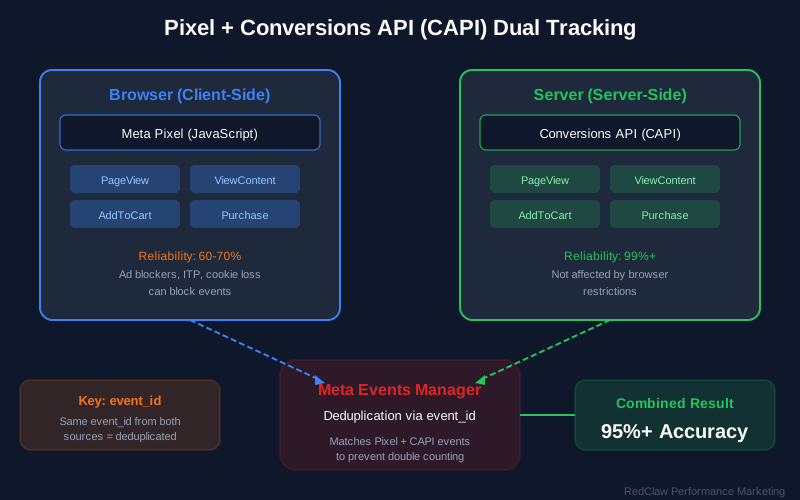
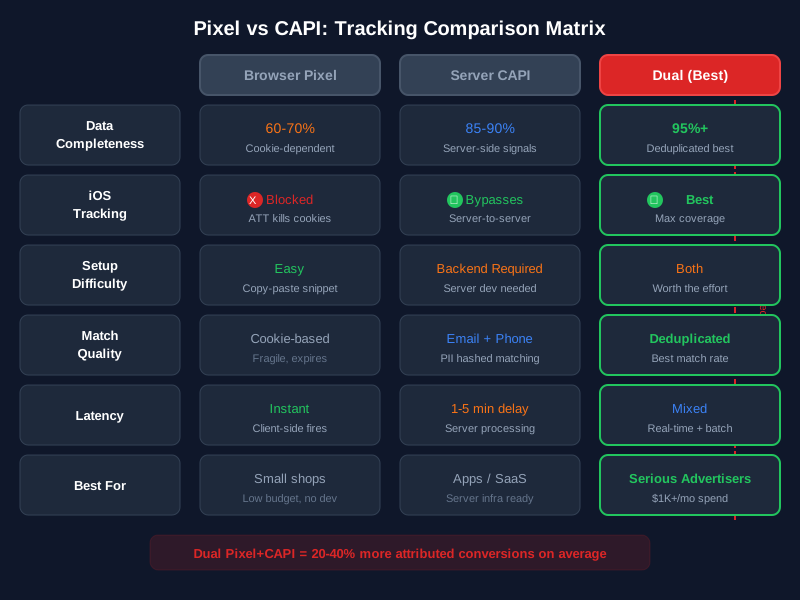
How Dual Tracking Works
User clicks ad → Lands on your website
    │
    ├── Pixel (Browser-Side)
    │   ├── JavaScript fires on page load
    │   ├── Tracks: PageView, ViewContent, AddToCart, Purchase
    │   ├── Sends data via browser to Meta
    │   └── Limitations: blocked by iOS ATT, ad blockers, cookie restrictions
    │
    ├── CAPI (Server-Side)
    │   ├── Your server sends event data directly to Meta's API
    │   ├── Tracks: same events but from server logs / backend
    │   ├── Bypasses browser limitations entirely
    │   └── Requires: server infrastructure or partner integration
    │
    └── Deduplication Layer
        ├── Meta matches Pixel + CAPI events using event_id
        ├── Prevents double-counting conversions
        └── Result: complete, accurate conversion data
Why Dual Tracking Matters:
- iOS 14.5+ App Tracking Transparency (ATT)↗ opt-out rates exceed 75% -- these users are invisible to Pixel alone
- Browser-based ad blockers affect 25-40% of desktop users, and Google's Privacy Sandbox↗ initiative is further reducing cookie-based tracking capabilities
- CAPI provides server-side redundancy that is immune to browser restrictions
- Combined data dramatically improves optimization signals, leading to better algorithmic performance
- Event Match Quality scores increase from 4-5 (Pixel only) to 8-9 (Pixel + CAPI)
For a complete implementation walkthrough with code examples, see our dedicated Pixel + CAPI Dual Tracking Setup Guide.
CAPI Implementation Options
Setup Options for Meta Advertising:
| Method | Difficulty | Best For | Match Quality |
|---|---|---|---|
| Partner Integration | Easy | Shopify, WooCommerce, BigCommerce | High |
| Google Tag Manager Server-Side | Medium | Custom websites, multiple platforms | High |
| CDP Integration | Medium | Enterprise (Segment, mParticle, Rudderstack) | Very High |
| Direct API | Hard | Custom development, maximum control | Maximum |
Event Priority and Configuration
| Event | Priority | Optimization Goal | Parameters to Pass |
|---|---|---|---|
| Purchase | Critical | Value + Currency accuracy | value, currency, content_ids, content_type |
| InitiateCheckout | High | Funnel progression signal | value, currency, num_items |
| AddToCart | High | Purchase intent indicator | value, currency, content_ids |
| ViewContent | Medium | Engagement signal | content_ids, content_type, value |
| Lead | High | B2B conversion tracking | value, currency |
| CompleteRegistration | Medium | User acquisition tracking | status, currency, value |
Event Match Quality Optimization
Event Match Quality (EMQ) is a score from 0 to 10 that measures how well Meta can match your conversion events back to specific users. Higher EMQ means better optimization, lower CPA, and more accurate attribution.
- Target: 8.0+ (out of 10)
- Key Factors: Email hash (most impactful), phone hash, fbp cookie, fbc click ID, external ID, IP address, user agent
- Impact of Improvement: Going from EMQ 5.0 to 8.0 typically reduces CPA by 15-25%
- How to Improve: Pass more customer data parameters with every event. At minimum, include hashed email, hashed phone, and the fbp/fbc cookies.
CAPI Setup Checklist
- Verify Pixel is firing on all pages (use Meta Pixel Helper extension)
- Install CAPI via partner integration or GTM Server-Side
- Configure server-side events for all priority events (Purchase, AddToCart, InitiateCheckout, ViewContent, Lead)
- Implement event deduplication using matching event_id parameters
- Pass customer data parameters: hashed email, hashed phone, fbp, fbc, external_id
- Test deduplication in Events Manager (check for "Deduplication" status)
- Monitor Event Match Quality scores weekly (target 8.0+)
- Set up conversion value tracking with accurate currency codes
- Configure custom conversions for any non-standard key actions
Critical: Without CAPI, you are missing 20-40% of conversion data from iOS devices, and your optimization signals are fundamentally incomplete. This is the single highest-impact technical improvement most advertisers can make.
Is your Pixel actually firing correctly? 73% of accounts we audit have tracking gaps that inflate CPA by 20-40%. Book a free tracking audit — we'll check your Pixel + CAPI setup in 24 hours.
The Learning Phase Explained
What Is the Learning Phase?
Every time you create a new ad set -- or make a significant edit to an existing one -- Meta's delivery system enters what it calls the Learning Phase. During this period, the algorithm is actively experimenting with different audiences, placements, and times of day to discover the most efficient way to deliver your ads and achieve your optimization goal.
You will see "Learning" displayed in the Delivery column of your ad sets during this period.
How the Learning Phase Works
- Exploration: The algorithm broadly tests different audience segments, placements, and delivery times
- Data Collection: Each impression, click, and conversion provides a signal that refines the algorithm's model
- Convergence: As data accumulates, the algorithm narrows its focus to the highest-performing combinations
- Stability: Once the ad set achieves approximately 50 optimization events in a 7-day window, it exits the learning phase and enters "Active" delivery
Why It Matters for Your Budget
During the learning phase, performance is inherently unstable. You may see:
- Higher-than-normal CPA (sometimes 2-3x your eventual steady-state CPA)
- Fluctuating daily results (one great day followed by two poor days)
- Inconsistent delivery volume
This is normal and expected. The algorithm is investing short-term efficiency to discover long-term optimal delivery patterns. Advertisers who panic and make changes during this period reset the learning phase and never allow the algorithm to stabilize.
What Triggers a Learning Phase Reset
Any "significant edit" resets the learning phase. Meta defines significant edits as:
- Budget changes greater than 20% (up or down)
- Audience changes (adding or removing targeting criteria)
- Creative changes (pausing or adding ads within the ad set)
- Bid strategy changes
- Optimization event changes
- Pausing the ad set for more than 7 days
How to Exit the Learning Phase Faster
- Set adequate budgets: Your daily budget should be at least 10x your expected CPA. If your target CPA is $20, budget at least $200/day per ad set.
- Consolidate ad sets: Fewer ad sets with larger budgets exit learning faster than many ad sets with small budgets. Aim for 3-5 ad sets maximum per campaign.
- Use Campaign Budget Optimization (CBO): CBO automatically allocates more budget to ad sets that are converting, helping them exit learning faster.
- Choose upstream events if needed: If Purchase events are too rare (fewer than 50/week), optimize for AddToCart or InitiateCheckout instead, then switch to Purchase once volume increases.
- Avoid edits during the first 7 days: Resist the urge to tweak. Set it and let it learn.
- Provide more creative: More ad variations give the algorithm more to test, which can accelerate learning by finding winning combinations faster.
Learning Limited: What to Do
If your ad set shows "Learning Limited" instead of transitioning to "Active," it means the ad set is not generating enough optimization events. Solutions:
- Increase budget to drive more volume
- Broaden targeting to reach more potential converters
- Optimize for a higher-volume event (e.g., AddToCart instead of Purchase)
- Merge with another ad set to consolidate conversion data
- Improve creative to increase conversion rates
Budget Allocation: Real-World Scenarios
One of the most common questions in Facebook advertising is "How much should I spend?" The answer depends on your business stage, product price, and goals. Here are three real-world scenarios with specific allocation recommendations.
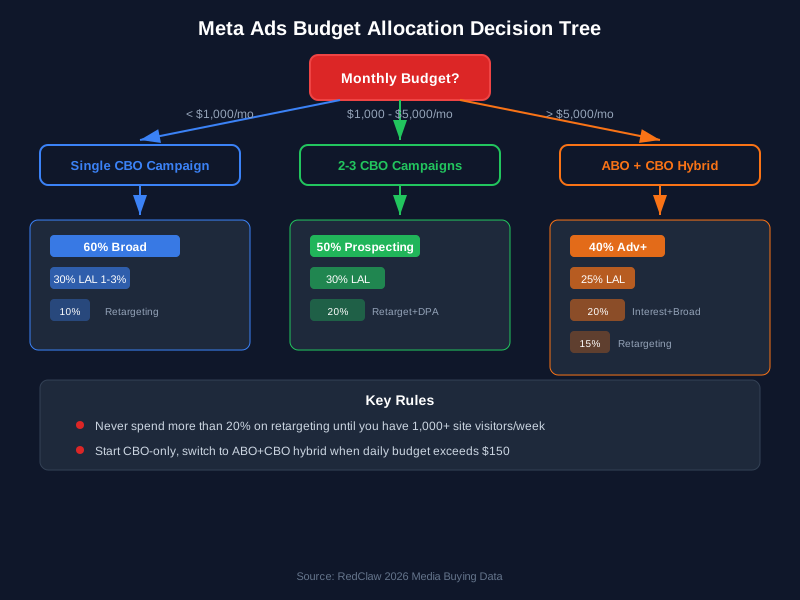
Scenario 1: $1,000/Month -- Testing Phase
Business Profile: Small business or startup testing Meta Ads for the first time. Average order value $50-100. Goal: validate product-market fit and find initial winning creative.
| Allocation | Monthly Budget | Daily Budget | Purpose |
|---|---|---|---|
| Testing Campaign | $700 | ~$23/day | 1 campaign, 2 ad sets (prospecting + retargeting), 8-10 creative assets |
| Retargeting | $200 | ~$7/day | Website visitors + email list warm audiences |
| Creative Production | $100 | N/A | UGC creator partnerships or DIY video production |
Strategy at $1,000/month:
- Run ONE campaign with ONE prospecting ad set and ONE retargeting ad set
- Use CBO to let Meta allocate between the two
- Focus on broad targeting (country-level) for prospecting
- Test 8-10 creative assets to find your initial winners
- Optimize for AddToCart (not Purchase) since you will not hit 50 purchases/week at this budget
- Run for a full 30 days before making strategic decisions
- Expect: This budget is about learning, not profitability. You are buying data.
Expected Outcomes:
- 300-600 landing page views
- 20-50 add-to-carts
- 5-15 purchases
- Enough data to identify 2-3 winning creative concepts
Scenario 2: $5,000/Month -- Growth Phase
Business Profile: Established business with validated product-market fit. Average order value $50-150. Goal: scale profitable customer acquisition and build retargeting audiences.
| Allocation | Monthly Budget | Daily Budget | Purpose |
|---|---|---|---|
| Prospecting (Broad) | $2,500 | ~$83/day | Primary new customer acquisition, 2-3 ad sets |
| Prospecting (Lookalike) | $1,000 | ~$33/day | 1% lookalike from purchasers, 1 ad set |
| Retargeting | $1,000 | ~$33/day | Cart abandoners + engaged visitors, dynamic product ads |
| Testing | $500 | ~$17/day | New creative concepts, new angles, new formats |
Strategy at $5,000/month:
- Run 2-3 campaigns: core prospecting, lookalike prospecting, retargeting
- Prospecting should use broad targeting with 5-8 creative assets per ad set
- Retargeting should use dynamic product ads and testimonial content
- Dedicate 10% of budget to pure creative testing (new hooks, new formats)
- Optimize for Purchase events (you should achieve 50+ purchases/week at this level)
- Refresh creative every 2-3 weeks based on frequency and performance data
- Implement full Pixel + CAPI tracking if not already done
Expected Outcomes:
- 1,500-3,000 landing page views
- 100-300 add-to-carts
- 30-80 purchases (ROAS target: 2-4x)
- Clear winning audiences and creative to scale further
Scenario 3: $20,000/Month -- Scaling Phase
Business Profile: Growth-stage business with proven Meta Ads performance. Average order value $75-200. Goal: aggressive scaling while maintaining ROAS targets.
| Allocation | Monthly Budget | Daily Budget | Purpose |
|---|---|---|---|
| Advantage+ Shopping | $8,000 | ~$267/day | Primary revenue driver, full automation |
| Manual Prospecting | $4,000 | ~$133/day | Broad + lookalike, 3-4 ad sets with diverse creative |
| Retargeting | $3,000 | ~$100/day | Multi-stage retargeting funnel (view, cart, checkout) |
| Testing Lab | $2,000 | ~$67/day | New creative concepts, new markets, new products |
| Brand Awareness | $1,500 | ~$50/day | Video views + reach campaigns for TOFU |
| Seasonal / Promo | $1,500 | ~$50/day | Reserved for flash sales, holidays, product launches |
Strategy at $20,000/month:
- Lead with Advantage+ Shopping as your primary revenue campaign
- Layer manual campaigns for segments ASC does not cover well
- Build a multi-stage retargeting funnel: viewers (7-day), cart abandoners (3-day), checkout abandoners (1-day)
- Invest seriously in brand awareness to fuel the top of funnel
- Maintain a dedicated testing budget to prevent creative stagnation
- Scale winning ad sets by 20-30% every 5 days (vertical scaling)
- Expand to new geographic markets via horizontal scaling
- Implement automated rules for 24/7 budget management
Expected Outcomes:
- 10,000-20,000 landing page views
- 500-1,500 add-to-carts
- 150-400 purchases (ROAS target: 3-6x)
- Established brand presence and growing remarketing audiences
Not sure how to allocate your ad budget? Use our free ROAS Calculator to find your breakeven point, or try the Budget Planner for a complete allocation strategy.
Case Study: From $0 to $50K/Month in Meta Ad Spend
To illustrate how these budget frameworks work in practice, here is an anonymized case study from a direct-to-consumer women's fashion brand that scaled from zero Meta Ads experience to $50,000/month in profitable ad spend over six months. The brand sells mid-range apparel ($40-120 AOV) through their Shopify store, primarily targeting women aged 25-45 in the United States.
Starting Point (Month 0): The brand had a Shopify store generating $15,000/month in organic and referral revenue. They had never run paid social advertising. Their website had no Meta Pixel installed, no CAPI integration, and no conversion tracking infrastructure.
Month-by-Month Progression:
| Month | Ad Spend | Revenue (attributed) | ROAS | CPA | CTR | Key Action |
|---|---|---|---|---|---|---|
| 1 | $1,500 | $3,000 | 2.0x | $38 | 0.9% | Installed Pixel + CAPI, launched first campaign with 8 UGC videos, optimized for AddToCart |
| 2 | $3,000 | $7,500 | 2.5x | $32 | 1.2% | Switched to Purchase optimization, added 10 new creative assets, built first lookalike audience |
| 3 | $8,000 | $24,000 | 3.0x | $26 | 1.5% | Launched Advantage+ Shopping alongside manual campaigns, creative testing identified 3 winning hooks |
| 4 | $15,000 | $52,500 | 3.5x | $22 | 1.8% | Scaled winners vertically (20%/week), added retargeting funnel, expanded to CA + TX + NY |
| 5 | $30,000 | $120,000 | 4.0x | $19 | 2.1% | Expanded nationwide, added seasonal creative for spring collection, GenAI variations on top performers |
| 6 | $50,000 | $225,000 | 4.5x | $16 | 2.3% | Full Advantage+ Shopping at 60% of spend, multi-stage retargeting, 30+ active creative assets |
What Made the Difference:
-
Patience in Month 1. They resisted the urge to scale prematurely. The first month was purely about installing tracking infrastructure and gathering initial data. The 2.0x ROAS was breakeven for them, but the conversion data it generated fueled everything that followed.
-
Creative volume. By Month 3, they were producing 15-20 new creative assets per month --- a mix of UGC testimonials, product demonstration videos, and lifestyle imagery. This creative volume gave the algorithm enough material to find winning combinations automatically. Their top-performing ad was a 22-second UGC video of a customer showing three outfit combinations, which ran profitably for 6 weeks before fatigue set in.
-
Letting Advantage+ lead. The transition from manual campaigns to Advantage+ Shopping in Month 3 was the single biggest performance inflection point. ROAS jumped from 2.5x to 3.0x in the first two weeks, and CPA dropped by $6 without any other changes. By Month 6, Advantage+ accounted for 60% of their total spend and delivered consistent 4.5x+ ROAS.
-
Dual tracking from day one. Because they implemented Pixel + CAPI in Month 1 (using our Pixel + CAPI setup guide), their Event Match Quality score was 8.5 from the start. This gave the algorithm significantly better optimization signals compared to competitors relying on Pixel alone.
-
Disciplined scaling. They followed the 20-30% weekly increase rule strictly. No sudden budget jumps, no panic pauses during soft days. This steady approach kept the learning phase stable and avoided the performance crashes that come from aggressive budget changes.
The Bottom Line: This brand went from $0 in paid social to $225,000/month in Meta-attributed revenue in six months, with a blended ROAS of 4.5x. The total investment to reach this point was approximately $107,500 in ad spend, generating approximately $432,000 in attributed revenue --- a cumulative ROAS of 4.0x including the less efficient early months.
Optimization Best Practices
Campaign Launch Checklist for Meta Ads
Before launching any Facebook advertising campaign, verify every item on this list:
- Conversion tracking verified (Pixel + CAPI both firing, deduplication confirmed)
- Product catalog synced and approved (for dynamic ads)
- Creative assets uploaded (minimum 5 per ad set, ideally 8-10)
- Budget sufficient for learning phase (10x target CPA per day minimum)
- Attribution window set correctly (7-day click, 1-day view for most businesses)
- Landing pages optimized for mobile (load time under 3 seconds)
- UTM parameters configured for Google Analytics cross-referencing
- Automated rules set up for budget management and performance alerts
- Naming conventions applied consistently across campaign, ad set, and ad levels
- Exclusion audiences configured (existing purchasers excluded from prospecting)
Scaling Strategies for Facebook Advertising
| Strategy | Method | Risk Level | Best For |
|---|---|---|---|
| Vertical Scaling | Increase budget 20-30% every 5 days | Medium | Proven campaigns with stable ROAS |
| Horizontal Scaling | Duplicate winning ad sets to new audiences/geos | Low | Market expansion |
| Creative Scaling | Add new creative variations to winning ad sets | Low | Maintaining performance as you scale |
| Advantage+ Scaling | Increase ASC budget + add more creative assets | Low | E-commerce at scale |
Automated Rules for Meta Advertising
Set up automated rules to manage campaigns 24/7 without manual intervention:
Recommended Rules:
- Pause underperformers: Pause ad sets with CPA greater than 2x target for 3 consecutive days
- Scale winners: Increase budget 20% if ROAS exceeds target for 5 consecutive days
- Frequency cap: Send notification when any ad's frequency exceeds 3.0 in a 7-day window
- Spend pacing: Pause ad set if daily spend exceeds 2x daily average without any conversions by 2 PM
- Creative rotation: Reduce budget on ads with CTR below 1% after 1,000+ impressions
For advanced automation setup, our Automation Rules Setup Guide covers every rule type in detail.
Automated Rules Templates
Here are five copy-paste automation rules you can set up in Meta Ads Manager↗ under "Rules" to manage campaigns around the clock without manual intervention. Each rule can be created in under 2 minutes.
Rule 1: Kill Switch --- Pause High-CPA Ad Sets
- Apply to: All active ad sets
- Condition: Cost per purchase is greater than $[YOUR_TARGET_CPA x 2] in the last 3 days
- Action: Pause ad set
- Notification: Send email notification
- Why it works: Prevents runaway spend on underperforming ad sets during off-hours or weekends. Set the threshold at 2x your target CPA to allow for normal variance while catching true underperformers.
Rule 2: Scale Winners --- Increase Budget on Top Performers
- Apply to: All active ad sets
- Condition: Cost per purchase is less than $[YOUR_TARGET_CPA x 0.7] AND amount spent is greater than $[YOUR_DAILY_BUDGET x 3] in the last 5 days
- Action: Increase daily budget by 20%
- Frequency: Once per week (maximum)
- Why it works: Automatically scales ad sets that are beating your CPA target by 30%+ with statistically meaningful spend. The weekly frequency cap prevents the algorithm from over-scaling before it can stabilize at the new budget level.
Rule 3: Creative Fatigue Alert --- Flag Tired Ads
- Apply to: All active ads
- Condition: Frequency is greater than 3.0 in the last 7 days AND CTR (link) has decreased by more than 20% compared to the previous 7-day period
- Action: Send notification (do not auto-pause --- review manually first)
- Why it works: Catches creative fatigue before it tanks your CPA. The dual condition of high frequency AND declining CTR reduces false positives from ads that naturally have high frequency in small retargeting audiences.
Rule 4: Overspend Protection --- Pause Zero-Conversion Spenders
- Apply to: All active ad sets
- Condition: Amount spent today is greater than $[YOUR_DAILY_BUDGET x 0.5] AND purchases today equals 0 AND time of day is after 2:00 PM (account timezone)
- Action: Pause ad set until the next day
- Why it works: If an ad set has spent half its daily budget by mid-afternoon with zero conversions, the remaining hours are unlikely to recover. This preserves budget for the next day when the algorithm gets a fresh start.
Rule 5: Learning Phase Protection --- Prevent Edits During Learning
- Apply to: All active ad sets with "Learning" delivery status
- Condition: Amount spent is less than $[YOUR_DAILY_BUDGET x 50] (estimated cost of 50 conversions)
- Action: Send notification (reminder: do not edit this ad set)
- Why it works: Sends you a reminder that an ad set is still in the learning phase and should not be modified. While this rule cannot prevent manual edits, the regular notifications serve as a guardrail against premature optimization.
Reporting & Analytics
Key Metrics Every Advertiser Must Track
Effective Meta advertising requires regular performance monitoring. Here are the essential metrics organized by their purpose:
Revenue Metrics:
- ROAS (Return on Ad Spend) -- Your primary profitability indicator. Calculate as Revenue / Ad Spend. Target varies by industry but 3:1 or higher is generally healthy.
- CPA (Cost Per Acquisition) -- How much you pay for each conversion. Must be below your maximum allowable acquisition cost.
- AOV (Average Order Value) -- Track whether your ads attract high-value or low-value customers.
Efficiency Metrics:
- CTR (Click-Through Rate) -- Measures creative relevance. Below 1% signals weak creative; above 2% is strong.
- CPC (Cost Per Click) -- Auction competitiveness indicator. Rising CPC with stable CTR means increased competition.
- CPM (Cost Per 1,000 Impressions) -- Tracks auction cost trends. Seasonal spikes (Q4, holidays) are normal.
Engagement Metrics:
- Frequency -- Average number of times each user sees your ad. Above 3.0 indicates creative fatigue.
- Video ThruPlay Rate -- Percentage watching 15+ seconds. Below 20% signals the hook is failing.
- Conversion Rate -- Percentage of landing page visitors who convert. Low rates indicate a landing page problem, not an ads problem.
Setting Up Custom Reports
Build these three custom reports in Ads Manager for comprehensive monitoring:
Report 1: Daily Performance Dashboard Columns: Delivery, Amount Spent, Purchases, Purchase ROAS, CPA, CTR (Link), CPM, Frequency Breakdown: Day Comparison: Previous Period Schedule: Daily email to team
Report 2: Creative Performance Analysis Columns: Ad Name, Impressions, CTR (Link), ThruPlay Rate, Purchases, ROAS, CPA Breakdown: By Ad Filter: Impressions > 1,000 Schedule: Weekly
Report 3: Audience Insights Columns: Ad Set Name, Reach, Impressions, CPA, ROAS, Conversion Rate Breakdown: Age, Gender, Placement Schedule: Bi-weekly
Looker Studio Dashboard Template
While Meta Ads Manager provides solid native reporting, building a Looker Studio (formerly Google Data Studio) dashboard gives you a unified view of Meta Ads performance alongside your GA4 analytics data, website behavior, and revenue metrics in one place. Here are the five essential widgets every Meta Ads dashboard should include.
Widget 1: KPI Scorecards with Trend Arrows Display your top-line metrics --- ROAS, CPA, Total Revenue, Total Spend, and CTR --- as large scorecard tiles with comparison to the previous period. Include directional arrows (green for improvement, red for decline) so stakeholders can assess performance at a glance without digging into tables. Connect this to Meta's Marketing API via the Supermetrics or Funnel.io connector.
Widget 2: Daily Spend vs Revenue Time Series A dual-axis line chart showing daily ad spend on one axis and daily revenue on the other. This visualization immediately reveals whether spend and revenue are moving in proportion. When the lines diverge --- spend rising while revenue flattens --- it signals optimization issues or creative fatigue before the aggregate ROAS metric catches it.
Widget 3: Campaign Performance Table with Heat Map A sortable table showing each active campaign with columns for Spend, Revenue, ROAS, CPA, CTR, and Frequency. Apply conditional formatting (heat map colors) so the best and worst performers are visually obvious. Include a filter for date range and campaign objective so stakeholders can drill into specific campaign types.
Widget 4: Creative Performance Breakdown A bar chart or table showing individual ad performance ranked by ROAS or CPA. Include the ad name, thumbnail (if your connector supports it), impressions, CTR, CPA, and ROAS. This widget answers the critical question "which creative is winning right now?" and should be reviewed weekly to inform creative refresh decisions.
Widget 5: Funnel Conversion Visualization A funnel chart showing the drop-off at each stage: Impressions to Link Clicks, Link Clicks to Landing Page Views, Landing Page Views to Add to Cart, Add to Cart to Initiate Checkout, Initiate Checkout to Purchase. Each stage shows the conversion rate and absolute numbers. This identifies exactly where you are losing potential customers and whether the issue is ad-side (weak creative) or site-side (poor landing page experience).
Setup tip: Use Supermetrics, Funnel.io, or the native Facebook Ads connector in Looker Studio to pull Meta Ads data automatically. Schedule the dashboard to refresh daily and email a PDF summary to your team every Monday morning for a weekly performance review cadence.
Attribution Model Selection
Meta offers several attribution windows that affect how conversions are counted and reported:
| Attribution Window | What It Counts | Best For |
|---|---|---|
| 7-day click, 1-day view | Conversions within 7 days of click OR 1 day of view | Most businesses (default, recommended) |
| 7-day click | Only click-based conversions within 7 days | Conservative measurement, B2B |
| 1-day click | Only conversions within 24 hours of click | Impulse purchases, low-AOV products |
| 1-day click, 1-day view | Short-window click + view attribution | Quick-decision products |
Important: Your attribution window affects what the algorithm optimizes for. Using 1-day click tells Meta to find users who convert immediately, while 7-day click allows the algorithm to find users who research before purchasing. Choose the window that matches your actual customer journey, and cross-reference Meta's reported conversions with your GA4 data to validate accuracy.
Common Pitfalls to Avoid
Critical Mistakes in 2026 Meta Ads
1. Over-Targeting
- Wrong: Multiple interest layers, narrow demographics, age 25-30 only
- Right: Broad targeting + strong creative + AI optimization
- Impact: Over-targeting increases costs by 15-30% and limits the algorithm's ability to find your best customers
2. Creative Fatigue Ignorance
- Wrong: Running the same ads for months without refresh
- Right: Refresh creative every 2-4 weeks minimum, maintain a production pipeline
- Impact: Fatigue can increase CPA by 50%+ and tank your ROAS
3. Insufficient Conversion Data
- Wrong: Optimizing for clicks or impressions instead of conversions
- Right: Value-based optimization with purchase events, or upstream events if volume is low
- Impact: Wrong optimization goal wastes 60%+ of budget on low-quality traffic
4. iOS 14.5+ Blindness
- Wrong: Relying solely on pixel data for attribution
- Right: CAPI implementation + Aggregated Event Measurement + EMQ optimization
- Impact: Missing 20-40% of conversion data makes optimization impossible
5. Premature Optimization
- Wrong: Changing campaigns during the learning phase, panicking after 48 hours
- Right: Waiting for 50+ conversions before making any major adjustments
- Impact: Resets learning, extends time to results, wastes the data you already paid for
6. Ignoring Mobile Experience
- Wrong: Desktop-optimized landing pages, slow load times, small text
- Right: Mobile-first creative and landing pages that load in under 3 seconds
- Impact: 90%+ of Meta traffic is mobile -- a poor mobile experience kills conversion rates
7. Poor Tracking Setup
- Wrong: Missing pixel events, no CAPI, no deduplication
- Right: Complete dual tracking with EMQ 8.0+ and verified deduplication
- Impact: You cannot optimize what you cannot measure, and incomplete data actively misleads the algorithm
Compliance Considerations for Facebook Advertising
Understanding Meta's advertising policies is essential to avoid account restrictions. For businesses in regulated industries, read our comprehensive Meta Advertising Policy & Compliance Guide.
Key compliance areas:
- Prohibited content policies: Weapons, drugs, discriminatory practices, misleading claims --- always verify your creative against the Facebook Ads Library↗ to see how competitors in your industry handle compliance
- Special ad categories: Housing, employment, credit (restricted targeting and creative requirements)
- Data usage restrictions: Health information, financial data, children's data handling
- Creative standards: Before/after claims require caution, no misleading content, no clickbait
- Landing page quality: Must match ad claims, no deceptive practices, clear pricing and terms
What to Do When Your Ad Gets Rejected
Ad rejections are frustrating but common --- even experienced advertisers deal with them regularly. Meta's automated review system flags ads based on pattern matching, which means legitimate ads sometimes get caught in the filter. Here is the 5-step process to resolve rejections quickly:
Step 1: Read the rejection reason carefully. Go to Ads Manager, find the rejected ad, and click "See Details" next to the rejection notice. Meta provides a specific policy category (e.g., "Personal Attributes," "Misleading Claims," "Prohibited Content") as documented in the Meta Business Help Center↗. Understanding the exact policy violation is essential before attempting a fix.
Step 2: Check your ad against the specific policy. Visit Meta's Advertising Standards↗ and read the full policy text for the cited violation. Common triggers include before/after imagery, income claims, assumptions about personal attributes (age, race, health conditions), and landing pages with pop-ups or auto-play audio.
Step 3: Edit the ad to address the violation. Modify the specific element that triggered the rejection. If the rejection was for "Personal Attributes," rephrase from "Are you struggling with..." to "Many people find that..." If the rejection was for "Misleading Claims," add disclaimers or remove exaggerated language. If the landing page triggered the issue, fix the page first, then resubmit.
Step 4: Request a manual review. After editing, click "Request Review" in Ads Manager. A human reviewer will examine your ad, which typically takes 24-48 hours. Manual reviews overturn automated rejections approximately 30-40% of the time for well-constructed ads.
Step 5: If the appeal fails, create a new ad. Sometimes it is faster to create a new ad with adjusted creative and copy rather than fighting the review system. Use the rejection as a learning opportunity to understand Meta's policy boundaries and build compliant creative from the start.
For a deep dive, read our Complete Meta Ads Approval Guide covering industry-specific compliance strategies, pre-submission checklists, and how to handle account-level restrictions.
Meta Ads FAQ
Frequently Asked Questions About Meta Advertising
1. What is the minimum budget for Meta Ads?
The minimum budget for Meta Ads depends on your campaign type and goals. For Advantage+ Shopping Campaigns, we recommend $100/day minimum to exit the learning phase effectively. For standard campaigns, $50/day is the practical minimum for meaningful optimization. Campaigns with budgets below $20/day often struggle to generate enough conversion data for AI optimization. As a rule of thumb, your daily budget should be at least 10x your target CPA.
2. How long does the learning phase last?
The learning phase for Facebook advertising campaigns typically lasts until you achieve 50 optimization events (conversions) per ad set per week. This usually takes 7-14 days for Advantage+ campaigns and 3-7 days for standard campaigns. Avoid making significant changes (budget, audience, creative, or bid strategy) during this period as it resets the learning phase and wastes the data you have already paid for.
3. What is CAPI and why do I need it?
CAPI (Conversions API) is Meta's server-side tracking solution that works alongside the Facebook Pixel. You need it because iOS 14.5+ privacy changes and browser ad blockers limit pixel tracking effectiveness. CAPI sends conversion data directly from your server to Meta, ensuring you capture 20-40% more conversion data that would otherwise be lost. For the full technical specification, see Meta's Conversions API documentation↗. It also significantly improves your Event Match Quality score, leading to better optimization and lower CPAs.
4. How do I improve my ROAS on Meta Ads?
To improve ROAS (Return on Ad Spend) in your Meta advertising campaigns:
- Implement CAPI for complete attribution data
- Test creative continuously and refresh every 2-4 weeks
- Use broad targeting and let AI optimize delivery
- Optimize for purchase value, not just conversion count
- Improve landing page conversion rates (this is often the biggest lever)
- Set up multi-stage retargeting campaigns for cart and checkout abandoners
- Use Advantage+ Shopping for e-commerce with 10-20 diverse creative assets
5. What creative performs best on Meta Ads in 2026?
In 2026, video content (especially UGC-style) performs best for Facebook advertising. Key characteristics of winning creative:
- 15-30 seconds in length (short and punchy)
- Vertical 9:16 aspect ratio (Reels and Stories optimized)
- Captions always included (85% watch without sound)
- Strong hook in first 3 seconds (problem statement or bold claim)
- Authentic, non-polished aesthetic (UGC outperforms studio content 2:1)
- Clear call-to-action that matches the campaign objective
6. Should I use Advantage+ Shopping or manual campaigns?
For most e-commerce businesses, Advantage+ Shopping Campaigns outperform manual campaigns with 17% better CPA on average. Use Advantage+ when you have 50+ products in catalog, $100+/day budget, quality creative assets (10-20), and existing conversion data. Use manual campaigns for complex funnels, heavily regulated industries, or when you need granular control over specific audience segments that ASC does not serve well.
7. How often should I refresh my creative?
Refresh your Meta Ads creative every 2-4 weeks to avoid fatigue. Warning signs that you need fresh creative immediately: frequency score above 3.0, CTR declining week-over-week, CPA increasing while CPM stays stable, and engagement rate dropping. Maintain a creative pipeline with 5-10 assets ready to deploy at any time so you are never caught without fresh content.
8. What targeting should I use in 2026?
In 2026, use broad targeting for prospecting campaigns: country or region only, no interest targeting, let AI find your audience. Use 1-3% lookalikes based on high-LTV customers as a secondary prospecting signal. Reserve detailed targeting and custom audiences for retargeting only. This approach leverages Meta's AI to find users most likely to convert across its entire user base.
9. How do I track Meta Ads performance accurately?
For accurate Facebook advertising tracking:
- Install both Pixel (browser) and CAPI (server) with event deduplication
- Verify all events are firing correctly using Events Manager test tool
- Configure UTM parameters for Google Analytics cross-referencing
- Use first-party data (hashed email, phone) to maximize Event Match Quality
- Compare Meta reported data with GA4 analytics (expect 10-20% variance)
- Monitor Event Match Quality scores weekly (target 8.0+)
- Set up custom conversions for non-standard key actions
10. What is the best campaign structure for Meta Ads?
The best campaign setup structure in 2026 is simplified and consolidated:
Campaign 1: Prospecting (Objective: Sales, CBO enabled)
├── Ad Set 1: Broad Targeting (country-level)
│   └── 5-10 creative assets (mix of video and static)
└── Ad Set 2: Lookalike 1-3% (from high-LTV customers)
    └── 5-8 creative assets

Campaign 2: Retargeting (Objective: Sales)
├── Ad Set 1: Website visitors 7-day (cart + checkout abandoners)
│   └── 3-5 dynamic product ads + testimonials
└── Ad Set 2: Engaged users 30-day
    └── 3-5 offer-focused creative
Key principles: 3-5 ad sets maximum per campaign, separate prospecting and retargeting into different campaigns, broad targeting for prospecting, multiple diverse creative assets per ad set, and consolidate rather than fragment.
11. How much should a complete beginner budget for their first Meta Ads test?
A realistic first test budget is $600-$1,000 over 30 days ($20-33/day). This amount generates enough data to identify winning creative concepts and validate whether your product converts through paid social. Anything below $15/day typically fails to exit the learning phase, meaning the algorithm never optimizes properly and your results are unreliable. Think of this initial investment as buying data, not directly buying customers. If your first month shows any positive signal --- even breakeven ROAS --- you have a foundation to scale.
12. What is the difference between CBO and ABO, and which should I use?
CBO (Campaign Budget Optimization) sets the budget at the campaign level and lets Meta automatically distribute spend across ad sets based on real-time performance. ABO (Ad Set Budget Optimization) sets a fixed budget per ad set, giving you manual control over spend allocation. In 2026, CBO is the recommended default for most advertisers because the algorithm allocates budget more efficiently than manual adjustments. Use ABO only when you need guaranteed minimum spend on specific audience segments (for example, ensuring a retargeting ad set gets a fixed daily budget regardless of prospecting performance) or during structured creative tests where you need equal spend across variants.
13. How long does the learning phase actually take in practice?
The learning phase officially ends when an ad set accumulates approximately 50 optimization events (typically purchases) within a 7-day window. In practice, this means 3-7 days for well-funded campaigns ($100+/day with proven creative) and 10-14 days for lower-budget campaigns ($20-50/day). Advantage+ Shopping campaigns tend to exit learning faster because the AI has more automation levers to pull. If your ad set shows "Learning Limited" after 14 days, it means conversion volume is too low --- either increase budget, broaden targeting, or optimize for a higher-volume event like Add to Cart.
14. Should I use Advantage+ or manual campaigns in 2026?
The answer depends on your business type and conversion volume. Advantage+ Shopping is the clear winner for e-commerce businesses with product catalogs, delivering an average 17% CPA improvement over manual campaigns. However, manual campaigns still outperform in several scenarios: highly regulated industries (iGaming, finance, healthcare) where you need granular control over compliance and geo-targeting, complex B2B funnels with multi-step conversion events, niche products with very specific audiences that Advantage+ may not efficiently identify, and early-stage testing when you want to isolate specific variables. The best approach for most advertisers is to run both: Advantage+ as your primary revenue driver and 1-2 manual campaigns for specific strategic needs.
15. Can I run Meta Ads for iGaming or crypto businesses?
Yes, but with significant restrictions. Meta allows advertising for licensed online gambling operators in approved jurisdictions, subject to strict compliance requirements: valid gambling licenses displayed, age-targeting restrictions (21+ in the US), geographic restrictions matching license jurisdiction, mandatory responsible gambling messaging, and no creative depicting financial outcomes or guaranteed winnings. For cryptocurrency, the rules vary by sub-category: licensed crypto exchanges can advertise with prior approval, but ICOs, DeFi protocols, and unregulated tokens are generally prohibited. Both verticals require pre-approval through Meta's restricted category application process. Given the complexity, working with an agency experienced in regulated verticals significantly reduces the risk of account suspensions. See our Meta Advertising Policy & Compliance Guide for the complete regulatory breakdown and our iGaming advertising strategies for industry-specific approaches.
What's Next: Your Meta Ads Action Plan
Meta Ads in 2026 rewards advertisers who embrace AI-driven optimization while maintaining creative excellence and complete data infrastructure. Success in Facebook advertising requires adapting to the new paradigm where algorithms handle targeting and delivery while humans focus on creative quality, strategic direction, and accurate measurement.
Your First 30 Days Action Plan:
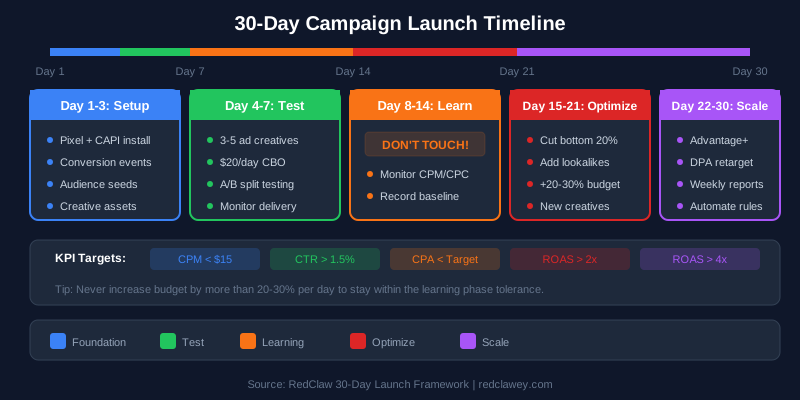
Week 1: Foundation
- Set up Business Manager with proper permissions and 2FA
- Implement Pixel + CAPI dual tracking (setup guide here)
- Configure GA4 integration with UTM parameters
- Audit landing pages for mobile performance
Week 2: Launch
- Create your first campaign following the step-by-step guide above
- Upload 8-10 creative assets per ad set
- Set budgets according to your scenario ($1K, $5K, or $20K)
- Configure automated rules for performance management
Week 3: Learn
- Let the learning phase complete (do not touch anything!)
- Monitor Events Manager for tracking accuracy
- Review creative performance data (impressions, CTR, ThruPlay rate)
Week 4: Optimize
- Identify winning creative (lowest CPA, highest ROAS)
- Pause underperformers, scale winners by 20%
- Launch new creative variations based on winning concepts
- Set up custom reports for ongoing monitoring
Key Takeaways for Meta Advertising Success:
- Simplified account structure with fewer, broader ad sets that give the algorithm room to optimize
- Creative-first approach with continuous testing, diverse formats, and regular refresh cycles
- Robust dual tracking through Pixel + CAPI integration with Event Match Quality scores above 8.0
- Patience during learning phases -- the algorithm needs data before it can deliver results
💡 Need expert help? RedClaw's performance marketing team specializes in Meta Ads campaign setup, CAPI implementation, and full-funnel optimization. Whether you are launching your first campaign or scaling to six figures monthly, we build data-driven strategies that deliver measurable ROAS. Get a free consultation →
- Data-driven scaling based on proven performance metrics, not gut feeling
- Budget allocation that matches your stage -- test at $1K, grow at $5K, scale at $20K
The platform will continue evolving toward greater automation and AI-driven optimization. Advertisers who adapt to this paradigm -- focusing on creative quality, signal provision, and strategic oversight rather than manual micro-management -- will achieve sustainable competitive advantage in Meta advertising.
Need expert help scaling your Meta Ads? RedClaw Performance is a specialized performance marketing agency that helps businesses build, optimize, and scale profitable Meta advertising campaigns. From initial account setup and CAPI implementation to creative strategy and budget scaling, our team has managed millions in ad spend across e-commerce, SaaS, lead generation, and regulated industries. Get your free Meta Ads audit↗ and discover how much room you have to improve.
This Meta Ads guide is updated regularly to reflect the latest platform changes, algorithm updates, and best practices. Last updated: March 2026. For personalized campaign setup assistance and ongoing optimization, contact the RedClaw Performance Team↗.
Related Posts
- advertisingChatGPT Ads vs Meta vs Google: How They Differ and How to Split BudgetChatGPT ads act like a search ad, not a Meta replacement. Trigger, inventory, ban risk and access compared, plus a Meta-base, ChatGPT-position, GEO split.
- advertisingGEO Agency Services: How to Choose a Generative Engine Optimization ProviderChoosing a GEO agency comes down to whether they can prove mention rate, whether content is truly AI-liftable, and what the price includes. Here are 5 evaluation standards and a pre-contract checklist to avoid providers who rebadge SEO as GEO.
- advertisingHow to Get ChatGPT to Recommend Your Brand: 5 GEO StepsGetting ChatGPT to recommend you is GEO, not luck. Five steps: pin core questions, write liftable self-contained passages, build verifiable authority signals, cover conversational long-tail, and monitor mention rate. Plus an AI-citability checklist.