
Large Site Indexing: Page-Type Rules, Sitemap Hygiene, Mirrors and Multiple Domains
- RedClaw Performance Team
- RedClaw Performance Team
- Date
- Reading time
- 9 min read
TL;DR: On a content site with tens or hundreds of thousands of URLs, crawl budget is the ceiling and you cannot fix pages one at a time. We start with a page-type rulebook that decides which templates may be indexed and which get noindex, follow. Sitemaps then carry only 200-status, indexable URLs. Every child sitemap is known to Google. And someone checks the "last read" date daily. Mirror and direct-CDN domains are a business decision first: once you know whether real users still need them, pick canonical, an X-Robots-Tag noindex header, or a full 301. Always split GA4↗ by hostname, because the network total and the main domain can move in opposite directions. When you only want Google to drop a page, use the googlebot meta tag instead of a blanket robots noindex.

Low index coverage on big sites is rarely a content problem
Is low index coverage on a large site a content problem? Usually not: it is caused by crawl budget being spent on low-value URLs, not by a shortage of content, so publishing more articles does not fix it.
One video content site we took over listed 458,000 URLs across its sitemaps. Search Console reported 15.3k pages indexed and 88.2k not indexed, and Google only knew about roughly 100,000 URLs in total. More than two thirds of the sitemap had never even been discovered. Publishing another thousand articles on a site like that changes nothing. The new pages just join the back of the crawl queue.
Google's own guide to managing crawl budget on large sites↗ makes the trade-off explicit: time Googlebot spends on low-value URLs is time it does not spend on the ones you care about. So the goal of index management at this scale is not "get more pages indexed". It is getting the pages that deserve to rank in first, and moving everything else out of the way.
This article covers the foundation layer: page types, sitemaps, canonicals, redirects, mirror domains and how you read GA4. Deciding which old content should give up its share of crawl budget is a separate job, covered in our piece on large-scale content pruning. The two work together.
Start with a page-type rulebook
A page-type rulebook decides in advance which templates may be indexed and which get noindex, follow, and every later request is checked against that table.
A large site has a lot of pages but only a dozen or so templates. Rules per template scale. Judgement per URL does not. This is the version we work from:
| Page type | robots | In sitemap |
|---|---|---|
| Home, category pages 1 to 5, articles | index, follow | Home, category roots, articles |
| Home pagination, category page 6+, tag pagination, author pagination, archives, internal search | noindex, follow | No |
| Tag page with 3+ posts | index | No |
| Tag page with 1–2 posts | noindex (flips back to index at 3 posts) | No |
| 404 | Must return a real 404 status, never 200 | No |
The important detail is noindex, follow, not noindex, nofollow. Pagination and archives are not worth ranking, but they are how crawlers reach deep articles, so the links should still count. Google's robots meta tag reference↗ lists the directives if you need the exact syntax.
Two pagination details slip through constantly. Page one should link to the root path rather than /page/1/, otherwise the same page lives at two URLs. And the title should not say "Page 1". Page numbers start at page two.
The rulebook also gives your tickets authority. On big sites the SEO↗ person usually cannot touch the code and has to file requests with an engineering team. A request that matches the agreed rulebook gets scheduled. One based on a standard you invented that afternoon starts an argument instead.
Check one thing before filing: whether the project spec and the team rulebook disagree. We have seen a team standard require noindex on home pagination while the project document said nothing at all. In that situation, ask the owner which document wins before you raise the ticket.
Four sitemap rules
Keep four sitemap rules: list only 200-status indexable URLs, make every child sitemap known to Google, check the last-read date daily, and add back old pages that still get traffic.
On a small site a sitemap is nice to have. On a large one it is one of the strongest hints Google has about crawl priority. We hold sitemaps to four rules, each learned the hard way. Format limits (50,000 URLs or 50MB per file) are in the sitemaps.org protocol↗.
1. Only 200-status, indexable URLs
One content site we managed got about 85% of its organic traffic from Yandex. Its sitemap contained five old section URLs that had long since been 301-redirected to the home page. Google stopped reading that sitemap after 14 March 2026, and it stayed unread until we removed the redirects and resubmitted on 16 October. If a sitemap keeps serving redirects, Google reads it less often. That was the clearest example we have seen.
2. Make sure Google knows every child sitemap
This was the problem on the 458,000-URL site. It had 46 child sitemaps, only 9 of which had been submitted in Search Console, and Google knew about roughly 100,000 URLs. The fix is to submit a sitemap index file or submit every child file. Google's large sitemap guidance↗ recommends the index approach. We are still tracking how discovered and indexed counts change after the resubmission, so we have no result to publish yet.
3. Check the "last read" date every day
The Sitemaps report in Search Console shows when each file was last read. It is part of our daily check, and anything unread for more than three days gets investigated. Had someone watched that column, the half-year gap above would have been caught early.
The rule behind it is to trust production, not reports. Status codes, robots directives, canonicals and sitemap contents get verified with curl against the live site. Search Console, Bing and Yandex data lag by days or weeks, which makes them good for trends and poor evidence of what is live right now.
4. Leave tag pages out, but put traffic-earning old pages back
Tag pages stay out of the sitemap by rule. Old pages that still earn traffic, though, must be in it. On a video site we took over with a little over 10,000 articles, the sitemap only included posts above a certain ID. Another 517 older articles with Search Console impressions were missing from it entirely.
Canonicals and 301s: one way in
Each page's canonical should point to its own matching URL, and 301s should leave a single entry domain while preserving the original path, never sending everything to the homepage or using 302.
Canonicals point to themselves. Mirror sites point each page to its matching page on the main site, not everything to the home page. Pointing tens of thousands of pages at the home page tells Google they are all duplicates of it. That canonical either gets ignored or drags the inner pages down with it. Google's guide to consolidating duplicate URLs↗ explains how it chooses.
Our redirect policy:
- Keep one entry domain and 301 every other entry point to it.
- Never redirect everything to the home page. Keep the path and parameters and land on the matching page.
- Never use a 302 where a 301 belongs.
- No wildcard DNS. If any subdomain resolves, you are manufacturing duplicates.
Merged pages always get a 301, and the target must be the canonical URL. We have seen tag merges done as a 302 to a "sort by latest" view. That is two mistakes at once: a temporary redirect, pointing at a URL that should not be indexed in the first place.
Junk parameters such as ?replyTo= and ?comment-page= should 301 back to the clean URL. On a large site these multiply into thousands of URLs on their own, and every one of them eats crawl budget. For what actually gets indexed when templates generate pages at scale, see our programmatic SEO playbook.
Mirror domains: ask the business, then pick one of three
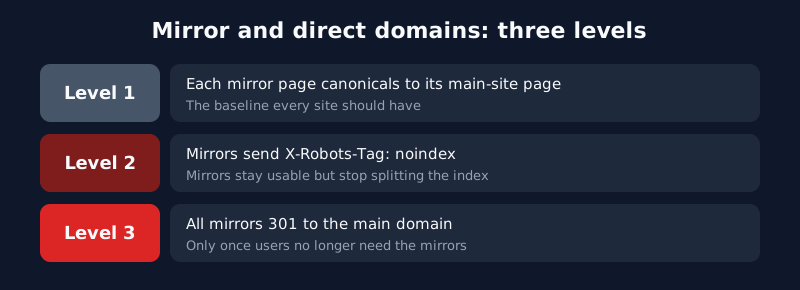
For a mirror domain, first ask the business whether users still need it, then choose one of three fixes: per-page canonical, an X-Robots-Tag noindex header, or a full 301 to the main domain.
Many mirror domains on large content sites exist on purpose, for users who cannot reach the main site. So the first question is not technical. Does anyone still need this mirror? Once you know, choose from three options, lightest first:
| Option | When to use it | Can users still use the mirror? |
|---|---|---|
| Page-level canonical from mirror to main site | Baseline; most sites already do it | Yes |
X-Robots-Tag: noindex header on the mirror | Mirror is kept for users, but you do not want it indexed or splitting traffic | Yes |
| 301 the whole mirror to the main domain | Confirmed that users no longer need the mirror | No, they land on the main domain |
A canonical is a hint, not a directive, so the first option alone still leaves the mirror indexable. The header option needs no template change and keeps the mirror usable, which makes it the cleanest choice when the mirror is for people but not for search engines. A full 301 is the most thorough, and it effectively retires the mirror. Do not do it without a business sign-off.
Another video site we took over had three mirror domains plus a direct CDN hostname. Before choosing anything on a setup like that, split traffic by domain. Which brings us to GA4.
Always split GA4 by hostname
GA4 must be split by hostname, because the network total and the main domain can move in opposite directions, such as a combined -20% while the main domain is +57.5%.
GA4 adds every hostname together by default, and that can point you the wrong way. On 29 September 2026 we looked at a site network whose combined organic traffic was down 20%. Split by hostname, the main domain was actually up 57.5%. The losses were all on mirrors. Acting on the combined number would have meant "fixing" a main site that was not broken.
It can run the other way too. On 13 October 2026, splitting hostnames on the 10,000-article video site showed Google traffic shifting from the main domain to the direct CDN hostname, with sessions there rising from 708 to 1,693. The total looked flat while the main domain was quietly losing share.
Add the hostname dimension to your reports or explorations (see Google's GA4 dimensions and metrics reference↗) and make the split part of the daily organic check. Google's guide to debugging search traffic drops↗ is a useful checklist, but on a multi-domain site the hostname split comes first.
When you only want Google to drop a page
To make only Google drop a page, use the googlebot meta tag with noindex, follow instead of a blanket robots noindex, so Bing, Yandex and other engines are unaffected.
This is the technique we use most on large sites, and the one most likely to backfire. If the main site and its mirrors share one CMS, a meta tag added on the main site shows up on the mirrors too. When we pruned the 10,000-article site, 4,977 of the 9,528 articles with zero Google impressions over 16 months still had traffic from other search engines or on mirrors. A blanket <meta name="robots" content="noindex"> would have taken that Yandex and Baidu traffic down with it.
If the aim is simply to keep Google from indexing a page and free up crawl budget, use the Google-specific tag:
<meta name="googlebot" content="noindex, follow">
Only Googlebot reads it. Bing, Yandex and Baidu ignore it. Yandex has its own yandex name, documented in its meta robots help↗, and Bing's indexing principles are in the Bing Webmaster Guidelines↗. This follows a rule we keep on multi-engine sites: if only one engine has a problem, fix it for that engine and leave the site-wide structure alone.
To be straight about it: we have not yet measured how much the googlebot-only noindex actually helps crawl budget. On the 10,000-article site the zero-traffic old articles are listed by ID as candidates, and we will track the effect once it ships. Pruning frees budget for valuable pages. It does not add traffic on its own, and the report to stakeholders should say so up front.
Every indexing change we ship gets verified against the same checklist and then tracked for several weeks. If your site has the same shape (lots of URLs, several domains, coverage stuck), you can see how we split the work in our SEO site management service, with ranges on the pricing page.
This is one chapter of our large-site SEO guide, which maps all six workstreams and the order to tackle them in your first week.
FAQ
Should noindexed pages also be blocked in robots.txt?
No. Once robots.txt blocks a URL, crawlers cannot see the noindex on it, and external links can keep it in the index. If you want a page out, let it be crawled so the noindex is read. Reach for robots.txt only when the URLs should not exist at all and you just want to save crawl budget.
Why keep tag pages out of the sitemap?
Tag counts get out of hand quickly, and listing them in the sitemap asks Google to spend budget on aggregation pages. Handle them through the rulebook (index at 3+ posts, noindex at 1–2) and let internal links do the discovery.
Isn't a 301 from the mirror to the main domain the simplest fix?
Technically yes, but many mirrors exist for users who cannot reach the main site, and a 301 locks them out. Ask whether the mirror still serves people. If it does, an X-Robots-Tag: noindex header keeps it out of the index while users carry on as before.
Search Console says a sitemap hasn't been read in weeks. What do I check first?
Curl the URLs inside it and look for 301s, 404s or noindexed pages. In our case five redirecting URLs kept a whole sitemap unread for half a year, and it recovered only after we cleaned them out and resubmitted.
Related Posts
- strategyAI Content Quality Checklist for Bulk Publishing: 12 Pre-Publish Checks and a Front-End AuditAI publishing errors at scale are template errors: one bug ships in a dozen posts. Our 12 pre-publish checks, a front-end audit, and why auto-fixes need a lint.
- strategyContent Pruning for Large Sites: A/B/C Tiers, Red Lines and Hard Evidence for MergesContent pruning on a 10,000+ page site: tier pages with 16 months of data, noindex for Googlebot only, never mass-delete, and merge duplicates only on proof.
- strategyLarge Site SEO: Six Traits, Six Rules, and a Working PlaybookLarge site SEO for content sites with tens of thousands of URLs: six shared traits, six rules, and how to handle indexing, pruning, tag pages and traffic drops.