
AI Content Quality Checklist for Bulk Publishing: 12 Pre-Publish Checks and a Front-End Audit
- RedClaw Performance Team
- RedClaw Performance Team
- Date
- Reading time
- 10 min read
TL;DR: When a team publishes AI-assisted content in bulk, the mistakes are almost never "one bad article." They come from a template or a pipeline step, so a single defect ships in a dozen posts at once. On a video content site we took over, several editors were each publishing around 30 entries a day. What held up was a short system: 12 checks before publishing, a real-browser audit after publishing (open the page, wait five seconds, scroll to the bottom), and a rule that every automated fix is followed by an independent lint run. If any check fails, the post does not go out. Three verification habits keep the audit honest: inspect the rendered DOM rather than raw HTML, use the right user agent, and re-check "video won't play" results in a foreground tab.

Bulk publishing fails in batches, not one post at a time
1 defect in a template or pipeline step ships in every post that passes through it that day, so fixed checks beat reviewing posts one by one.
The site in question had several editors producing AI-assisted posts in parallel, each at roughly 30 entries a day, and the process below was put together there in October 2026. At that volume, any weak step in the pipeline (a cleaning rule that misses a case, an editor that mangles one image syntax, an image host that goes offline) does not hurt one article. It hurts every article that passed through that step that day.
That changes how you think about quality. Line-by-line human review does not scale to this volume, and people are worst at catching exactly the kind of error that repeats. By the fifth occurrence your eyes stop seeing it. The approach that worked was the reverse: turn every error that has already happened into a fixed check, run every post through all of them, and block anything that fails. The list grows out of incidents rather than theory, which is why each item on it maps to something that actually broke.
This is also where search engines draw their line. Google's guidance on generative AI content↗ does not object to AI-assisted writing, but it is explicit that producing many pages with generative tools without adding value for users can fall under scaled content abuse in its spam policies↗. A batch of posts with leftover generation markers, broken images and off-topic endings looks exactly like low-value pages at scale, however they were made. A quality gate exists to stop that batch.
The 12 pre-publish checks (generalized)
The pre-publish checklist for bulk AI content has 12 checks in three groups, content consistency, generation residue and media syntax, and each one was added after a real incident.
These are the 12 entries we actually run, grouped into content consistency, generation residue and media syntax. Each one earned its place by breaking something real on that site.
Content and categorization
- Right category or channel. The most common bulk mistake is an entire batch dropped into a default category, or inheriting the previous batch's setting.
- Title matches the body. The model shifts the angle in the headline while the body still covers the original topic, or an editor rewrites the title and nobody touches the text.
- Brand names left over from source material. Other sites' names, brand terms or watermark text from the inputs slip into the body. Readers assume the post belongs to that brand, and the article starts to look scraped.
- Orphan headings. A subheading with nothing under it, usually from truncated generation or a cleaning rule that deleted the whole section.
- Repeated sentences. The same line shows up twice, typically where separately generated chunks were stitched together.
Generation residue
- Leftover generation markers. Prompt or template placeholders such as
[[…]]still sitting in the text. - Junk at the end. Unrelated news, an "AI analyst" style wrap-up, moralizing, "let us know what you think in the comments" prompts, or stray file names.
Images and video
- Reference-style image syntax.
![x][1]is valid markdown, but some editors and front-end renderers never turn it into an image, so the raw syntax shows on the page. - Dead image-host domains. The image URL points at a host that has stopped serving files. The back end shows a URL. The front end shows a broken image.
- A missing
!on the first image. Drop the exclamation mark and the image becomes a plain link. - Alt text that is just a file name.
IMG_2041.jpgtells neither readers nor search engines anything. - Video URLs stored as site paths only. Keep the
/videos…path and leave the domain out. If the video domain changes or dies, every post with a hard-coded domain breaks at the same moment.
If you do not run a video site, swap checks 8 through 12 for whatever media formats you use, but keep the three groups. Consistency problems, generation residue and media syntax have different causes and need different detection. The first two can mostly be caught with text matching. Part of the third only shows up on the rendered page, which is the next point.
Errors that only the front end reveals
Broken images and video in bulk-published posts only show on the live page, because the data is fine and the failure is in rendering, so a front-end audit must follow the 12 checks.
The most expensive lesson on that site: a clean-looking editor does not mean a clean page. A reference-style image looks like a perfectly reasonable line of markdown in the editor and saves without complaint, yet the live page renders it as raw text. A dead video domain is the same story. In the back end it is only a string. You find out it is unreachable when you press play on the live page.
Both errors are fine at the data layer and broken at the rendering layer, and a gate that only inspects data will never catch them. So the 12 checks are the first gate, not the only one. You need a second gate that looks at the finished page, and dropping either one means a whole class of errors will slip through every time.
The front-end audit has another benefit: it catches new kinds of failure that are not on the list yet. A checklist can only stop known problems. Each time the audit finds something the list missed, add it, which is how ours grew to 12 entries.
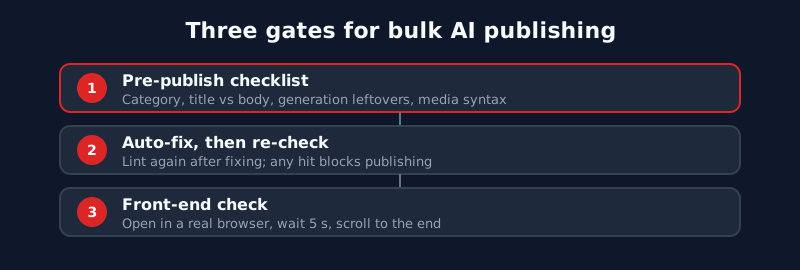
| Gate | When it runs | Catches | Misses |
|---|---|---|---|
| 12 pre-publish checks | Before saving | Residue, leftover brand names, syntax errors | Images and video that break at render time |
| Post-fix lint | After every automated fix | Variants the fix rules missed, damage the fix caused | Rendering-layer errors |
| Front-end audit | After publishing | Broken images, exposed markup, dead video, unknown new errors | At volume, relies on automation plus sampling |
The post-publish audit: real browser, five seconds, scroll to the bottom
A post-publish audit opens each article in a real browser, waits five seconds, scrolls to the bottom, then compares image counts, looks for exposed markup and confirms the video plays.
Our front-end audit is short, and each step is there for a reason:
- Open the article in a real browser, not curl and not the CMS preview.
- Wait five seconds so lazy-loaded images and JavaScript-mounted players appear.
- Scroll to the bottom. Lazy images only load when they come into view, so checking the first screen misses broken images further down.
- Count the images and compare against the number in the back end.
- Look for exposed markup such as
![,[[or](in the body text. - Click the video and confirm it actually plays, rather than showing an empty player frame.
Nobody has to do this by hand for every post. At volume you run it with browser automation, with the caveat that automation produces its own false results, covered below. A setup that holds up is automation across everything plus a few posts per batch checked by a person, with the two compared. A sample only tells you about the posts you sampled. The large-site SEO workflow post goes further into sampling versus full checks.
Every automated fix needs a check after it
Every automated fix to bulk content must be followed by an independent lint that re-runs the 12 pre-publish checks, and any hit blocks publishing.
Once you spot a template error, the natural move is a script that fixes the whole batch. We did that, and on 15 October 2026 it bit us: the fix script reported zero problems in 30 out of 30 posts, and manual review still found 2 with issues. The script claimed 100% clean when about 7% were not. It was not lying. It reported what it had fixed and never went back to confirm what was left.
Those are separate questions. A fix script answers "what did I change?" A check answers "what does it look like now?" If you only fix and never check, your "zero problems" is exactly as wide as the fix script's rules, and every variant outside them is treated as if it does not exist. The rule we settled on: every fix is followed by an independent lint that re-runs the 12 pre-publish checks, and any hit blocks publishing. Write the lint separately from the fixer, or at least make sure they do not share matching rules, otherwise both will miss the same variant.
Fix scripts also create new errors. A rule for trimming junk at the end that is written too broadly will remove the last real paragraph and leave an orphan heading behind. The post-fix lint catches that kind of side effect too, which is the other reason it cannot be skipped.
Before you re-save published posts
Before batch-editing published posts, know the two side effects of saving in the CMS: it resets the publish date and clears any fields, such as tags, that the fix did not write back.
When a batch fix touches posts that are already live, watch for two side effects we ran into in that site's CMS:
- Saving resets the publish date. An old post can come back as "published today," changing its sort order, its sitemap date and the date readers see.
- Saving clears fields you did not send. If the fix only writes back the body and not the tags, the tags are gone after the save. On a site with many tag pages that also thins out the archive pages. The tag page SEO audit covers how to manage those.
Before editing live posts, agree with whoever owns the CMS on which fields will change and what a save will do, then decide whether to edit in place, update the database directly, or leave the posts alone. If a bad batch cannot be repaired quickly, a cleaner option is to pull it from the index and fix it at your own pace. Both Google and Yandex honor a robots meta noindex↗, so you do not have to delete anything. For deciding what to keep, merge or remove, see large-site content pruning.
Verification habits: rendered DOM, the right user agent, foreground tabs
Automated front-end audits avoid three false results by inspecting the rendered DOM, using the right user agent, and re-checking background-tab video failures in a foreground tab.
Running the front-end audit through automation, we hit three kinds of false result.
Inspect the rendered DOM, not the raw HTML. Players and some content are mounted by JavaScript and simply are not in the source. We once used fetch plus DOMParser to decide a page had no video player, and it was wrong: the player only appeared once the browser ran the scripts. Structured data needs the same treatment. Confirm it in a browser, not just in the source.
Use the right user agent. Some back ends sit behind a WAF that blocks non-browser user agents, so a script receives a block page instead of the article. In the other direction, if you want to see the version Google sees, fetch with the Googlebot user agent.
Background tabs get throttled. Automation that opens many tabs to test video playback will see timers and media slowed down in the background tabs, and it reports a pile of "video won't play" failures. Re-check those one by one in a foreground tab. Most of them are false.
Last, a rule about numbers: every figure in an audit report carries its source and the time it was pulled. If you cannot find a number, say so. Do not estimate and do not carry over last round's figure. Had the "30 out of 30 clean" report said "this is the fix script's own claim, not an independent check," nobody would have read it as a pass. For the wider mechanics of publishing templated pages at scale, our programmatic SEO playbook covers the page-generation side.
This is one chapter of our large-site SEO guide, which maps all six workstreams and the order to tackle them in your first week.
FAQ
Will Google penalize AI-written articles?
Google's position is that it judges whether content helps people, not how it was produced. The risk is producing many pages that add no value, which its spam policies call scaled content abuse. Bing's webmaster guidelines↗ likewise list automatically generated, low-value content as something to avoid. Batches with generation residue, broken images and off-topic endings are the easiest to land in that bucket.
Do I need all 12 checks?
Not word for word. Build your own list using the same three groups: content consistency, generation residue and media syntax, with the media group adapted to the formats your site uses. What matters is that each check maps to an error that really happened, and that a single hit blocks the post instead of just lowering a score.
We already have an auto-fix script. Do we still need a separate check?
Yes. A fix script only knows what it changed, not the variants outside its rules. We have seen one report all 30 posts clean while manual review still found 2 with problems. Run an independent lint after every fix.
Can I run the front-end audit with curl?
No. curl returns raw HTML, so JavaScript-mounted players and lazy-loaded images are invisible, and a WAF may block it outright. Use a real browser, wait for the page to finish loading, scroll to the bottom, and test video in a foreground tab.
Sites that publish at this volume usually have indexing, tag page and pruning problems to manage at the same time, and when traffic does fall, the traffic drop diagnosis steps are a good place to start. If you would rather hand the whole process to a team that works on large sites every week, take a look at how our SEO site management service handles it. 12 checks before publishing always cost less than fixing a whole batch afterward.
Related Posts
- strategyContent Pruning for Large Sites: A/B/C Tiers, Red Lines and Hard Evidence for MergesContent pruning on a 10,000+ page site: tier pages with 16 months of data, noindex for Googlebot only, never mass-delete, and merge duplicates only on proof.
- strategyLarge Site Indexing: Page-Type Rules, Sitemap Hygiene, Mirrors and Multiple DomainsHow we manage indexing on content sites with hundreds of thousands of URLs: a page-type rulebook, four sitemap rules, canonical and 301 policy, mirror domains.
- strategyLarge Site SEO: Six Traits, Six Rules, and a Working PlaybookLarge site SEO for content sites with tens of thousands of URLs: six shared traits, six rules, and how to handle indexing, pruning, tag pages and traffic drops.