
Large Site SEO Workflow: Getting Fixes Shipped When You Can't Touch the Code
- RedClaw Performance Team
- RedClaw Performance Team
- Date
- Reading time
- 10 min read
TL;DR: On a content site with tens of thousands of URLs, most SEO↗ work is writing tickets, waiting for a sprint slot, checking the result and checking it again later. Our routine: sample at least 50 pages before filing anything. Send template problems to developers and per-article problems to the content team. Write every ticket with the same eight fields. Re-check items marked "done", since we have caught them reverted. Compare staging word by word and mark anything staging can't prove as "verify after release". We monitor six things daily and compare against a baseline every Monday. A sample result is reported as a sample. And "no change for now" counts as a plan, as long as it says why, what to watch, for how long and what would trigger action.

On large sites, SEO mostly means getting other people to ship
On a large site, SEO usually has no code access, so the job is writing tickets, getting developers or content teams to schedule them, then verifying and rechecking the results.
The large content sites we've taken over share one trait: there are far too many URLs to handle page by page, and the SEO person has no write access to the code. A video site with just over 10,000 posts, an article site with 80,000, a site whose sitemaps listed 458,000 URLs. Every robots change, every canonical fix, every template tweak had to go through a ticket and wait for a developer or editor to pick it up.
In that setup your output isn't "what I changed". It's "what I got shipped and confirmed". A vague ticket gets implemented literally and the problem survives. Too many tickets at once and the important one sinks under the easy ones. The process is the job.
The thing we underestimated early on: changes someone else ships can quietly disappear. A CMS upgrade, a template rebuild or a new contractor can wipe a setting you signed off months ago. Most of what follows exists because of that.
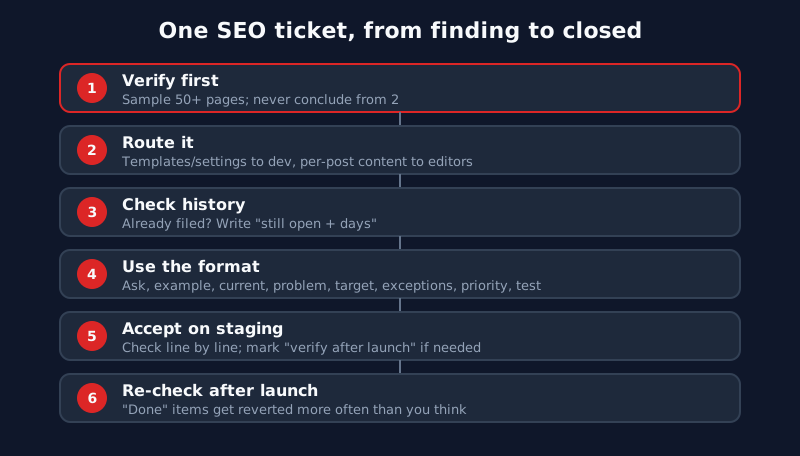
Before you file anything: verify, then route
Before filing an SEO ticket, sample at least 50 pages to see the distribution, then route by cause: templates and sitewide settings go to developers, per-article content goes to the content team.
Rule one is sample size. Two pages are enough to make a template problem look like a writing problem. We got caught by this in September 2026. When we widened the sample to 60 pages, one text field came out at exactly 130 characters on all 60. Numbers that uniform point to a template setting, not 60 writers making the same choice. Filing it with the content team would have had editors rewriting articles one by one with nothing to show for it.
So we sample 50+ pages and look at the distribution. If the problem clusters on one page type, one field or one exact length, it's almost always the template. If it's scattered and uneven, it's more likely individual content.
Once you know the type of problem, the owner follows. Templates and site-wide settings go to developers. Individual content (titles, body copy, image captions) goes to the content team. If you're not sure something is technically feasible, ask a developer informally first and write the ticket afterwards.
Anything that changes how users move through the site is a business call. Should mirror domains all 301 to the main domain? On these sites the mirrors are often kept on purpose for users who can't reach the main domain. Redirecting them because "they split our indexing" can cut those users off. We bring evidence to a meeting, agree on direction, then file. The order of options for mirrors is covered in large-site indexing and sitemaps.
Last step before filing: search the old tickets. If someone already raised it and it's still broken, update the original with "still not fixed, N days" instead of opening a duplicate. Duplicates make old problems look new and hide how long they've been waiting.
What goes into a ticket
Every SEO ticket uses the same eight fields in the same order, covering the request, example links, current state, problem, proposed change, exceptions, priority and acceptance criteria.
Our tickets always have the same eight fields in the same order:
| Field | What to write | Typical mistake |
|---|---|---|
| Request | One sentence on what changes | "Improve SEO" |
| Example URLs | Two or three real URLs | Naming the page type only |
| Current state | Source snippet or rendered DOM, with capture time | Describing from memory |
| Problem | What the current state causes | "Doesn't follow guidelines" |
| After | What the source should look like | A direction, not a spec |
| Exceptions | Pages this must not touch | Left blank, so it ships site-wide |
| Priority | P0–P3 | Everything is P0 |
| Acceptance criteria | How done is defined and checked | Missing, so nobody agrees on done |
"After" and "Exceptions" are the fields people skip and the ones that cause damage. "Add noindex to tag pages" can catch tags that carry real content. "Add noindex to tags below N posts, except these types" won't. How to set that threshold is in our tag page SEO audit piece.
Evidence for the current state means a curl result, the DOM as the browser actually renders it, or a search console screenshot, each with the time it was captured. Sites change constantly, and two weeks later an undated screenshot can't tell you whether it shows before or after.
Priority only means something if most tickets aren't P0. We keep P0 for things like whole sections dropping out of the index or broken status codes across the site. Title formats and missing structured data fields are usually P2 or P3.
"Done" doesn't mean it's still live
An SEO ticket marked done can still be reverted, so recheck it in the daily sweep and, on staging, compare TDK, H1 and robots against the ticket word for word.
This is the part we'd stress most. During a re-check in October 2026, one site's "noindex on /page/2/ pagination", marked done in February, was back to index. On another site, VideoObject markup marked done on 9 March 2026 was gone entirely. Both tickets still said "done". Without the re-check we'd have kept believing they were fixed.
That's why re-checking old tickets is part of the daily crawl, alongside status codes, robots and canonicals. When something has been reverted, we note "reverted" and the date on the original ticket rather than filing a new one.
Staging QA gets the same treatment. We compare titles, descriptions, H1s and robots against the spec word by word. In a batch we checked on 10 October 2026, 8 of 13 items passed, roughly 62%. Items that were simply wrong went back. Items staging didn't have enough data to prove were marked "verify after release", which is not a pass, and checked on release day.
Your QA method can be wrong too. Players and some content are injected by JavaScript, and we once got a false "no player on page" from fetch plus DOMParser. Now we check the rendered DOM in a real browser, including structured data. Some sites' firewalls block non-browser user agents, so we fetch with a Googlebot UA to see what Google sees. And browsers throttle background tabs, so a "video won't play" result from a background tab gets re-run in a foreground tab before anyone believes it.
Two things that look like admin are really QA prerequisites. On day one with a new site, audit access to the ticket docs, Search Console, GA4↗, Yandex and Bing, and request everything missing in one go. And some sites can't be reached from where you sit, so fetch them from a server in the target region or you'll be checking an error page.
Daily and weekly monitoring
SEO monitoring runs a daily sweep of 6 items plus a Monday baseline comparison, and status codes, robots, canonical and sitemap are always checked by curling the live site.
The daily check covers six items:
| Item | What we look at |
|---|---|
| Google traffic | 7-day clicks, impressions, CTR, position vs prior period |
| Google indexing and crawl | Sitemap last-read date and errors; URL Inspection on 15 URLs |
| Bing | Indexed count, 4xx/5xx, crawl issues |
| Yandex | Indexed pages, searchable pages, exclusion reasons (web UI if the API is down) |
| GA4 | Organic search at T-2, split by hostname |
| Live crawl and ticket QA | robots, canonical, nofollow, status codes; whether old tickets are live or reverted |
The 15 URLs are always the homepage, the 5 newest articles and 9 random older ones. New articles not being indexed within a day or two is normal. Old ones falling out is the signal, so they get most of the slots. We split GA4 by hostname because mirror and main-domain traffic often move in opposite directions. The GA4 dimensions and metrics reference↗ explains the hostname dimension.
Every Monday we compare traffic with the baseline, let the indexing sample build up to at least 50 URLs before stating an index rate, and review drop distribution for tag and core pages, noindex counts and new tag counts.
One hard rule: status codes, robots, canonicals and sitemaps get checked with curl against production. Search Console, Bing and Yandex reports lag by days or weeks. Use reports for trends and the live site for current state.
Another: if only one search engine is misbehaving, work on that engine and leave the site structure alone. If Bing returns 5xx while Google and Yandex are fine, it's a Bing issue. Follow the Bing Webmaster Guidelines↗ and its own reports. Rebuilding templates for it drags the other engines down with it. Robots directives also differ by engine, so read Google's↗ and Yandex's↗ docs separately.
Samples are not the whole site
Our most classic mistake was treating 15 spot checks as the whole site. On one video site, only the homepage came back indexed out of 15, which looked like the site had been dropped. The Search Console indexing report at the same time showed 15.3k indexed and 88.2k not indexed. Bad, but a very different problem from "only the homepage is left", with a different fix.
So a sample finding is written as "the sample shows", and it gets checked against the full report before it becomes a conclusion. Numbers in tickets and client reports come from full reports. Samples are for spotting problems.
Samples also jump around when the pages change. We've seen a crawl report flag "50 new issues" that turned out to be a different set of sampled pages with the same total. Our traffic drop diagnosis piece has a table of these false alarms.
Large sites start with limited crawl capacity, which is the premise of Google's crawl budget guide for large sites↗. On a site with a naturally low index rate, "most of the sample isn't indexed" may not be new. Compare with last week's and last month's full numbers before calling it a decline.
Writing conclusions, and why "no change for now" is a plan
An SEO conclusion states the data change and its scope first and the judgment last, and "no change for now" counts as a plan only if it says why, what to watch, for how long and what triggers action.
Our order for any conclusion is fixed: what changed in the data, how far it spreads, which pages, which queries, what those pages look like now, and only then the judgement. Start from a conclusion and you'll always find data that agrees.
Causes are graded on four levels:
| Level | Meaning |
|---|---|
| Confirmed | Technical, data or on-page evidence |
| Likely | Several signals agree |
| Unverified | Correlation only |
| Ruled out | Checked and excluded |
We don't accept "algorithm fluctuation" or "content lacks depth" as causes. They carry no evidence and no next step. Grading tells the reader which items can go straight into tickets and which need more watching, much like Google's guide to debugging traffic drops↗ narrows scope before naming a cause.
Judge impact by absolute traffic, not percentages. A search results page down 50% might be 500 clicks. Article pages down 10% might be 20,000.
With limited dev time, the right answer to many problems is to leave them alone for now. That has to be written as a plan, not "let's wait and see". We ask for four things: why we're not changing it, which metric we'll watch, for how long, and what level would trigger action. If you can write those four, the decision can be tracked and revisited like any other. If you can't, you probably haven't thought it through yet.
Output rhythm: one batch every two weeks
SEO tickets go out in one batch every two weeks with 2 to 4 items each, and the overflow waits in a backlog so every ticket can be finished, verified and rechecked.
We file one batch of tickets every two weeks, with 2 to 4 items per batch. The daily crawl always finds more than that. The extras go to a backlog.
Developers and editors have other projects. Hand them a dozen tickets and they'll clear the easy ones first while the one that matters waits. Small batches give each ticket a real chance to be built, checked and re-checked, and they keep SEO in step with the team instead of nagging from the side. Inside a batch we go indexing first, then pruning low-value content, then page-level titles and markup.
If your site has the same setup, where SEO can only file requests, that whole loop of tickets, QA, re-checks and monitoring is what our SEO for large sites and site networks work covers.
This is one chapter of our large-site SEO guide, which maps all six workstreams and the order to tackle them in your first week.
FAQ
What can SEO do without code access?
Quite a lot: work out what kind of problem it is, write tickets developers can act on, QA, re-check and monitor. Someone else ships the change, but SEO decides what changes and what counts as done.
How many tickets should go in one batch?
We file one batch every two weeks with 2 to 4 items and keep the rest in a backlog. Bigger batches get cherry-picked for the easy items.
Why re-check tickets already marked done?
Because they get reverted. In October 2026 we found two: a pagination noindex that had flipped back to index, and VideoObject markup that had vanished. CMS upgrades and template rebuilds are the usual cause.
Can 15 spot-checked URLs represent the whole site?
No. We've had 15 spot checks show only the homepage indexed while the full report showed 15.3k indexed and 88.2k not indexed. Use samples to find problems and full reports to size them.
Related Posts
- strategyAI Content Quality Checklist for Bulk Publishing: 12 Pre-Publish Checks and a Front-End AuditAI publishing errors at scale are template errors: one bug ships in a dozen posts. Our 12 pre-publish checks, a front-end audit, and why auto-fixes need a lint.
- strategyContent Pruning for Large Sites: A/B/C Tiers, Red Lines and Hard Evidence for MergesContent pruning on a 10,000+ page site: tier pages with 16 months of data, noindex for Googlebot only, never mass-delete, and merge duplicates only on proof.
- strategyLarge Site Indexing: Page-Type Rules, Sitemap Hygiene, Mirrors and Multiple DomainsHow we manage indexing on content sites with hundreds of thousands of URLs: a page-type rulebook, four sitemap rules, canonical and 301 policy, mirror domains.